> ## Documentation Index
> Fetch the complete documentation index at: https://docs.monad.xyz/llms.txt
> Use this file to discover all available pages before exploring further.
# How to generate user specific images in the Farcaster Mini App
Creating shareable moments in the Farcaster Mini App is a great way to engage with your users.
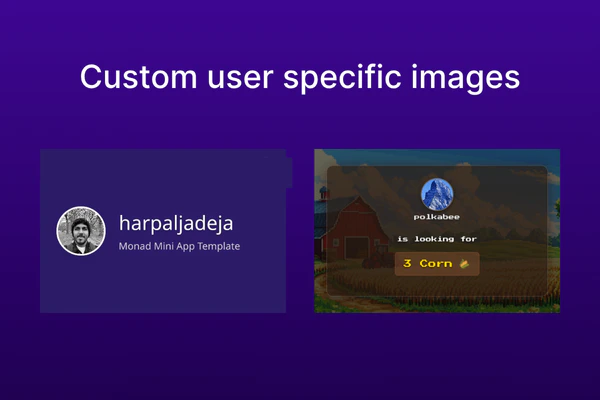
You can generate custom shareable user specific images in the Farcaster Mini App and make it easy for the user to share them!
In this guide we setup a dedicated endpoint `/api/og` for generating images and we use `@vercel/og` package to generate the images.
## Generating images
If you are using the [Monad Mini App template](https://github.com/monad-developers/monad-miniapp-template), you can simply
edit [`app/api/og/route.tsx`](https://github.com/monad-developers/monad-miniapp-template/blob/main/app/api/og/route.tsx)
to generate images of your choice.
```ts lines title="app/api/og/route.tsx" theme={null}
...
export async function GET(request: NextRequest) {
try {
const { searchParams } = new URL(request.url);
// The below is dependent on whether the username and image are passed as query params or not.
const username = searchParams.get('username') || 'User'; // Username of the user
const imageUrl = searchParams.get('image') || ''; // Image url of the user
const backgroundGradient = '#2D1B69'; // Background color of the image
// Load Inter font from the public folder
const interFontData = await fetch(
`${request.nextUrl.origin}/Inter.ttf`
).then((res) => res.arrayBuffer());
return new ImageResponse(
(
// Generate the image here
);
} catch (e) {
console.error('Error generating OG image:', e);
return new Response('Failed to generate image', { status: 500 });
}
}
...
```
If you are not using the template, you need to install `@vercel/og` package.
```bash theme={null}
npm install @vercel/og
```
Create a new file `app/api/og/route.tsx`, if you are using Next.js 14 or higher.
```ts lines title="app/api/og/route.tsx" theme={null}
import { ImageResponse } from '@vercel/og';
import { NextRequest } from 'next/server';
// Generate the image for every request
export const dynamic = "force-dynamic";
export async function GET(request: NextRequest) {
try {
const { searchParams } = new URL(request.url);
// The below is dependent on whether the username and image are passed as query params or not.
const username = searchParams.get('username') || 'User'; // Username of the user
const imageUrl = searchParams.get('image') || ''; // Image url of the user
return new ImageResponse(
(
// Generate the image here
);
} catch (e) {
console.error('Error generating OG image:', e);
return new Response('Failed to generate image', { status: 500 });
}
}
```
If you are not using Next.js, you can setup an endpoint or dedicated microservice to generate the images.
## Sharing images via the Mini App
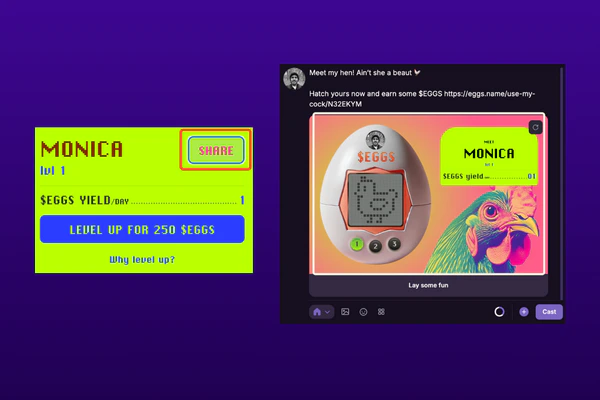
Add shareable elements to your Mini App, so the user can share the generated images via the Mini App.
Below is an example of a button that can be used to generate and share a custom image:
```tsx lines theme={null}
export default function GenerateAndShareCustomImage() {
...
const handleGenerateCustomOGImage = () => {
// Generate the image using the endpoint
const ogImageUrl = `${APP_URL}/api/og?username=${username}&image=${pfpUrl}`;
// Programmatically compose a cast with the generated image
actions?.composeCast({
// Text to be displayed in the cast
text: "I generated a custom OG image using Monad Mini App template",
// Image to be displayed in the cast
embeds: [ogImageUrl],
});
};
...
return (
);
}
```
 In this guide we setup a dedicated endpoint `/api/og` for generating images and we use `@vercel/og` package to generate the images.
## Generating images
If you are using the [Monad Mini App template](https://github.com/monad-developers/monad-miniapp-template), you can simply
edit [`app/api/og/route.tsx`](https://github.com/monad-developers/monad-miniapp-template/blob/main/app/api/og/route.tsx)
to generate images of your choice.
```ts lines title="app/api/og/route.tsx" theme={null}
...
export async function GET(request: NextRequest) {
try {
const { searchParams } = new URL(request.url);
// The below is dependent on whether the username and image are passed as query params or not.
const username = searchParams.get('username') || 'User'; // Username of the user
const imageUrl = searchParams.get('image') || ''; // Image url of the user
const backgroundGradient = '#2D1B69'; // Background color of the image
// Load Inter font from the public folder
const interFontData = await fetch(
`${request.nextUrl.origin}/Inter.ttf`
).then((res) => res.arrayBuffer());
return new ImageResponse(
(
// Generate the image here
);
} catch (e) {
console.error('Error generating OG image:', e);
return new Response('Failed to generate image', { status: 500 });
}
}
...
```
If you are not using the template, you need to install `@vercel/og` package.
```bash theme={null}
npm install @vercel/og
```
Create a new file `app/api/og/route.tsx`, if you are using Next.js 14 or higher.
```ts lines title="app/api/og/route.tsx" theme={null}
import { ImageResponse } from '@vercel/og';
import { NextRequest } from 'next/server';
// Generate the image for every request
export const dynamic = "force-dynamic";
export async function GET(request: NextRequest) {
try {
const { searchParams } = new URL(request.url);
// The below is dependent on whether the username and image are passed as query params or not.
const username = searchParams.get('username') || 'User'; // Username of the user
const imageUrl = searchParams.get('image') || ''; // Image url of the user
return new ImageResponse(
(
// Generate the image here
);
} catch (e) {
console.error('Error generating OG image:', e);
return new Response('Failed to generate image', { status: 500 });
}
}
```
If you are not using Next.js, you can setup an endpoint or dedicated microservice to generate the images.
## Sharing images via the Mini App
In this guide we setup a dedicated endpoint `/api/og` for generating images and we use `@vercel/og` package to generate the images.
## Generating images
If you are using the [Monad Mini App template](https://github.com/monad-developers/monad-miniapp-template), you can simply
edit [`app/api/og/route.tsx`](https://github.com/monad-developers/monad-miniapp-template/blob/main/app/api/og/route.tsx)
to generate images of your choice.
```ts lines title="app/api/og/route.tsx" theme={null}
...
export async function GET(request: NextRequest) {
try {
const { searchParams } = new URL(request.url);
// The below is dependent on whether the username and image are passed as query params or not.
const username = searchParams.get('username') || 'User'; // Username of the user
const imageUrl = searchParams.get('image') || ''; // Image url of the user
const backgroundGradient = '#2D1B69'; // Background color of the image
// Load Inter font from the public folder
const interFontData = await fetch(
`${request.nextUrl.origin}/Inter.ttf`
).then((res) => res.arrayBuffer());
return new ImageResponse(
(
// Generate the image here
);
} catch (e) {
console.error('Error generating OG image:', e);
return new Response('Failed to generate image', { status: 500 });
}
}
...
```
If you are not using the template, you need to install `@vercel/og` package.
```bash theme={null}
npm install @vercel/og
```
Create a new file `app/api/og/route.tsx`, if you are using Next.js 14 or higher.
```ts lines title="app/api/og/route.tsx" theme={null}
import { ImageResponse } from '@vercel/og';
import { NextRequest } from 'next/server';
// Generate the image for every request
export const dynamic = "force-dynamic";
export async function GET(request: NextRequest) {
try {
const { searchParams } = new URL(request.url);
// The below is dependent on whether the username and image are passed as query params or not.
const username = searchParams.get('username') || 'User'; // Username of the user
const imageUrl = searchParams.get('image') || ''; // Image url of the user
return new ImageResponse(
(
// Generate the image here
);
} catch (e) {
console.error('Error generating OG image:', e);
return new Response('Failed to generate image', { status: 500 });
}
}
```
If you are not using Next.js, you can setup an endpoint or dedicated microservice to generate the images.
## Sharing images via the Mini App
 Add shareable elements to your Mini App, so the user can share the generated images via the Mini App.
Below is an example of a button that can be used to generate and share a custom image:
```tsx lines theme={null}
export default function GenerateAndShareCustomImage() {
...
const handleGenerateCustomOGImage = () => {
// Generate the image using the endpoint
const ogImageUrl = `${APP_URL}/api/og?username=${username}&image=${pfpUrl}`;
// Programmatically compose a cast with the generated image
actions?.composeCast({
// Text to be displayed in the cast
text: "I generated a custom OG image using Monad Mini App template",
// Image to be displayed in the cast
embeds: [ogImageUrl],
});
};
...
return (
);
}
```
Add shareable elements to your Mini App, so the user can share the generated images via the Mini App.
Below is an example of a button that can be used to generate and share a custom image:
```tsx lines theme={null}
export default function GenerateAndShareCustomImage() {
...
const handleGenerateCustomOGImage = () => {
// Generate the image using the endpoint
const ogImageUrl = `${APP_URL}/api/og?username=${username}&image=${pfpUrl}`;
// Programmatically compose a cast with the generated image
actions?.composeCast({
// Text to be displayed in the cast
text: "I generated a custom OG image using Monad Mini App template",
// Image to be displayed in the cast
embeds: [ogImageUrl],
});
};
...
return (
);
}
```