> ## Documentation Index
> Fetch the complete documentation index at: https://docs.monad.xyz/llms.txt
> Use this file to discover all available pages before exploring further.
# How to use the React Native sponsored transactions template
Sponsored transactions enable users to interact with blockchain applications without needing to pay gas fees themselves, improving accessibility, user experience, and onboarding - especially for newcomers unfamiliar with crypto.
This guide walks you through using the [sponsored transactions template](https://github.com/monad-developers/react-native-privy-pimlico-gas-sponsorship-template) which uses [Expo](https://docs.expo.dev/), [React Native](https://reactnative.dev/), [Privy embedded wallet](https://docs.privy.io/wallets/wallets/create/create-a-wallet) and [Pimlico paymaster](https://docs.pimlico.io/references/permissionless/reference/clients/smartAccountClient) to build a mobile app with sponsored transactions on Monad.
You can start developing by editing the files inside the `app` directory. This project uses [file-based routing](https://docs.expo.dev/router/introduction).
This repo also has a `demo` branch that you can switch to if you'd like to inspect a completed version of the app first.
## Prerequisites
* Node.js
* NPM
* a [Privy account](https://dashboard.privy.io/)
* a [Pimlico account](https://dashboard.pimlico.io/)
- [Android Studio](https://developer.android.com/studio) (API version 35 and above)
* Guide to setup Android Studio for Expo is available [here](https://docs.expo.dev/workflow/android-studio-emulator/)
* [XCode](https://apps.apple.com/in/app/xcode/id497799835?mt=12)
* Guide to setup iOS Simulator for Expo is available [here](https://docs.expo.dev/workflow/ios-simulator/)
1. Create app:
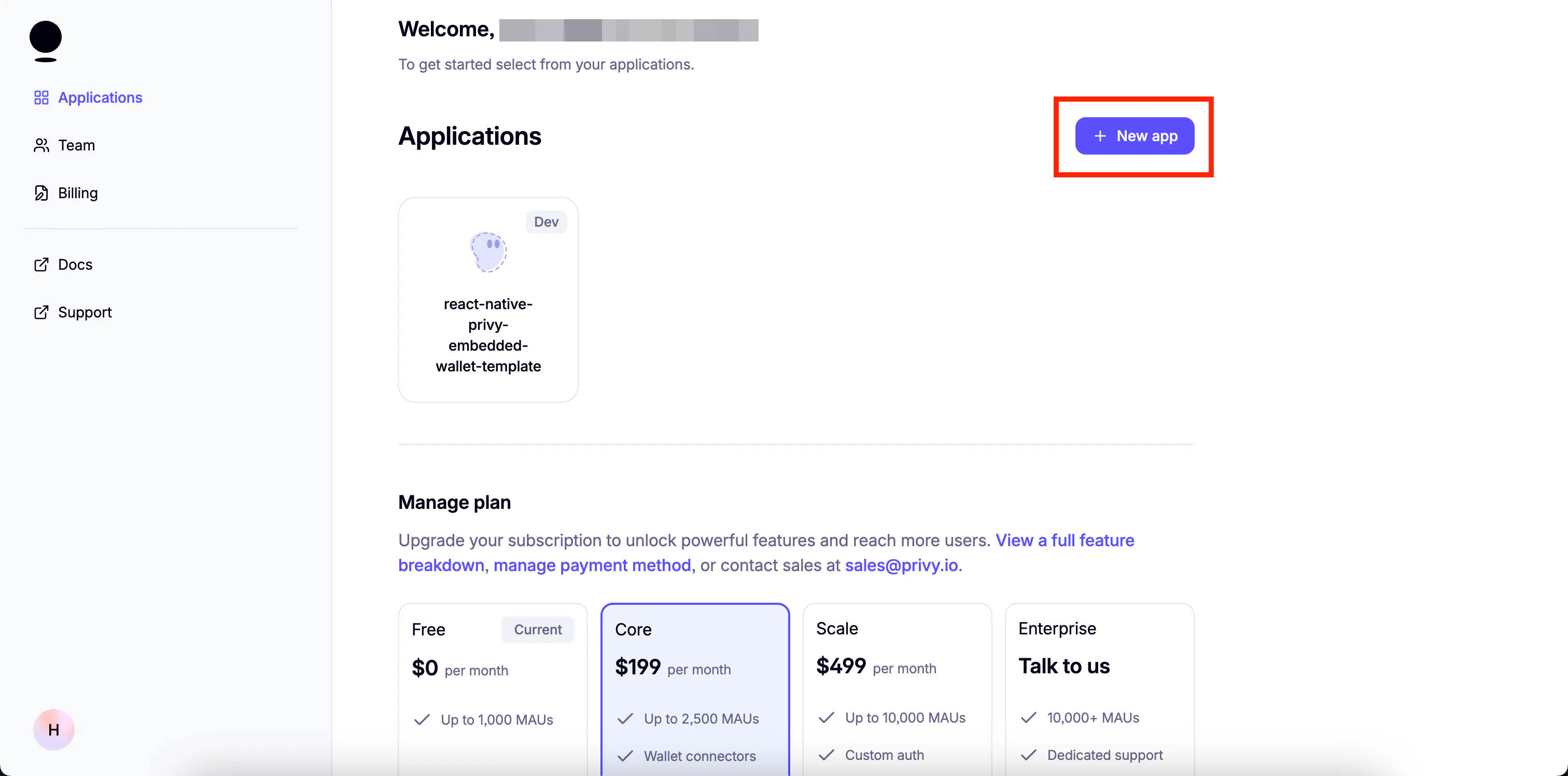
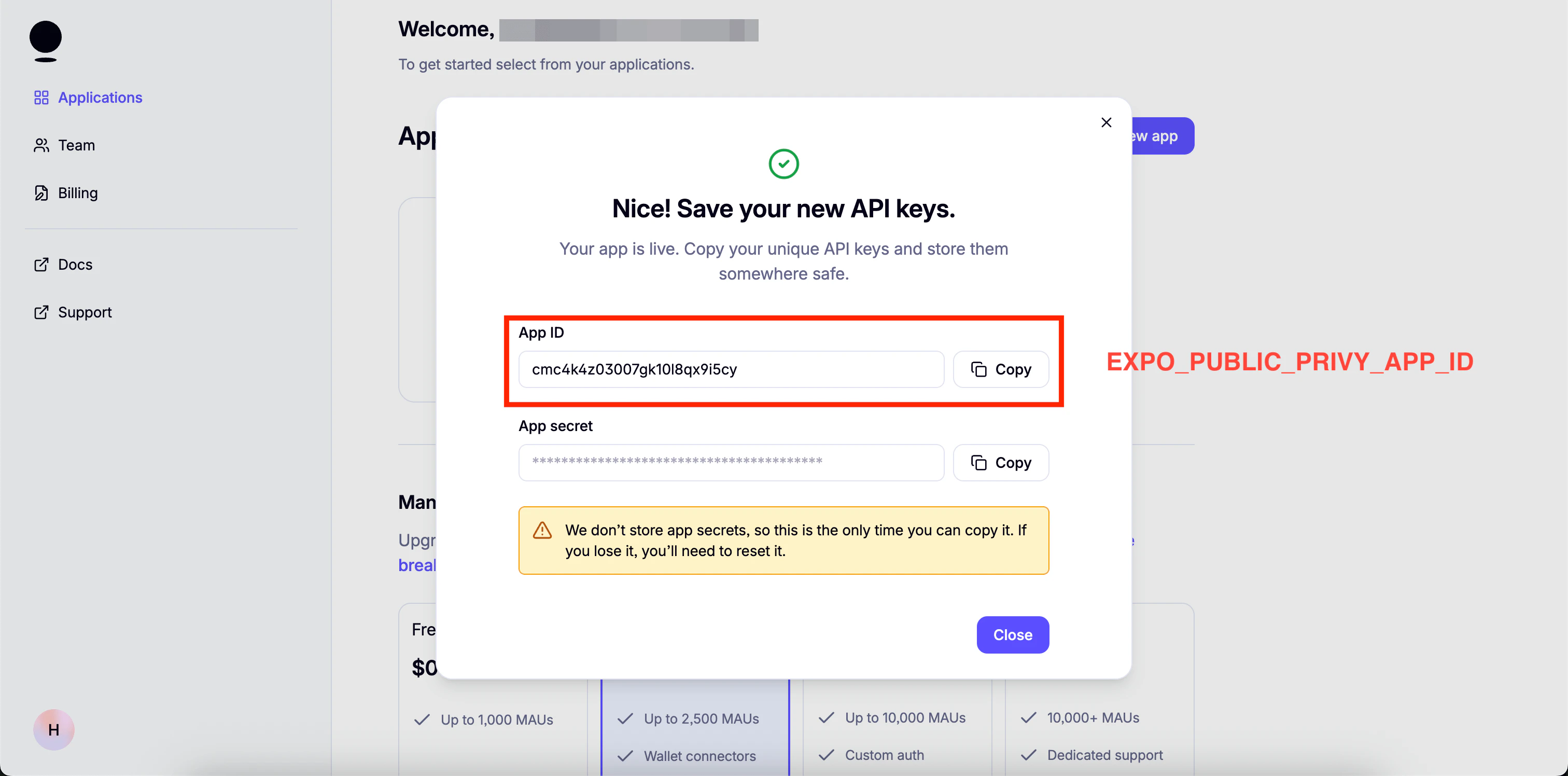
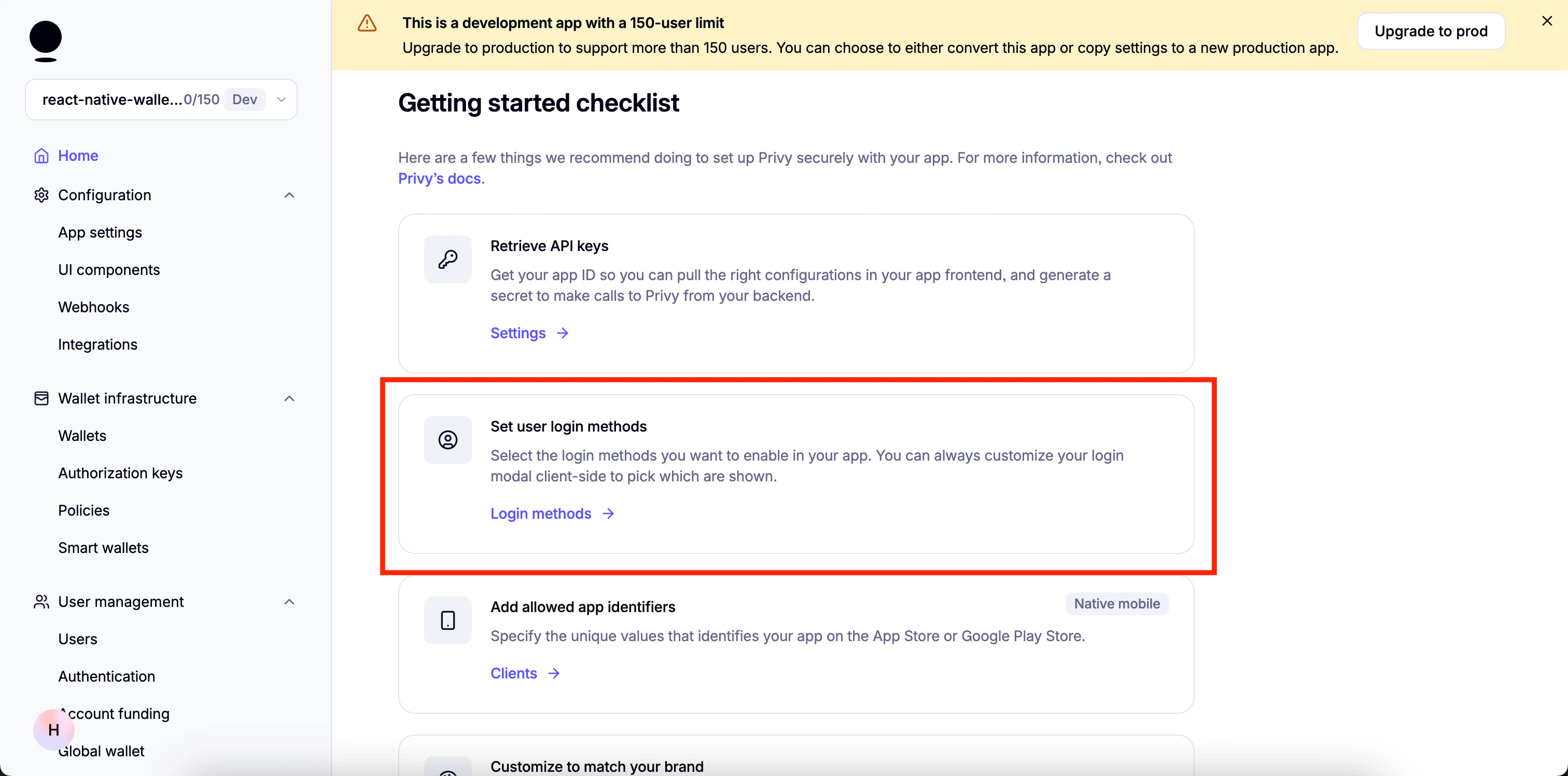
1. Set up login methods:
3. Enable email:
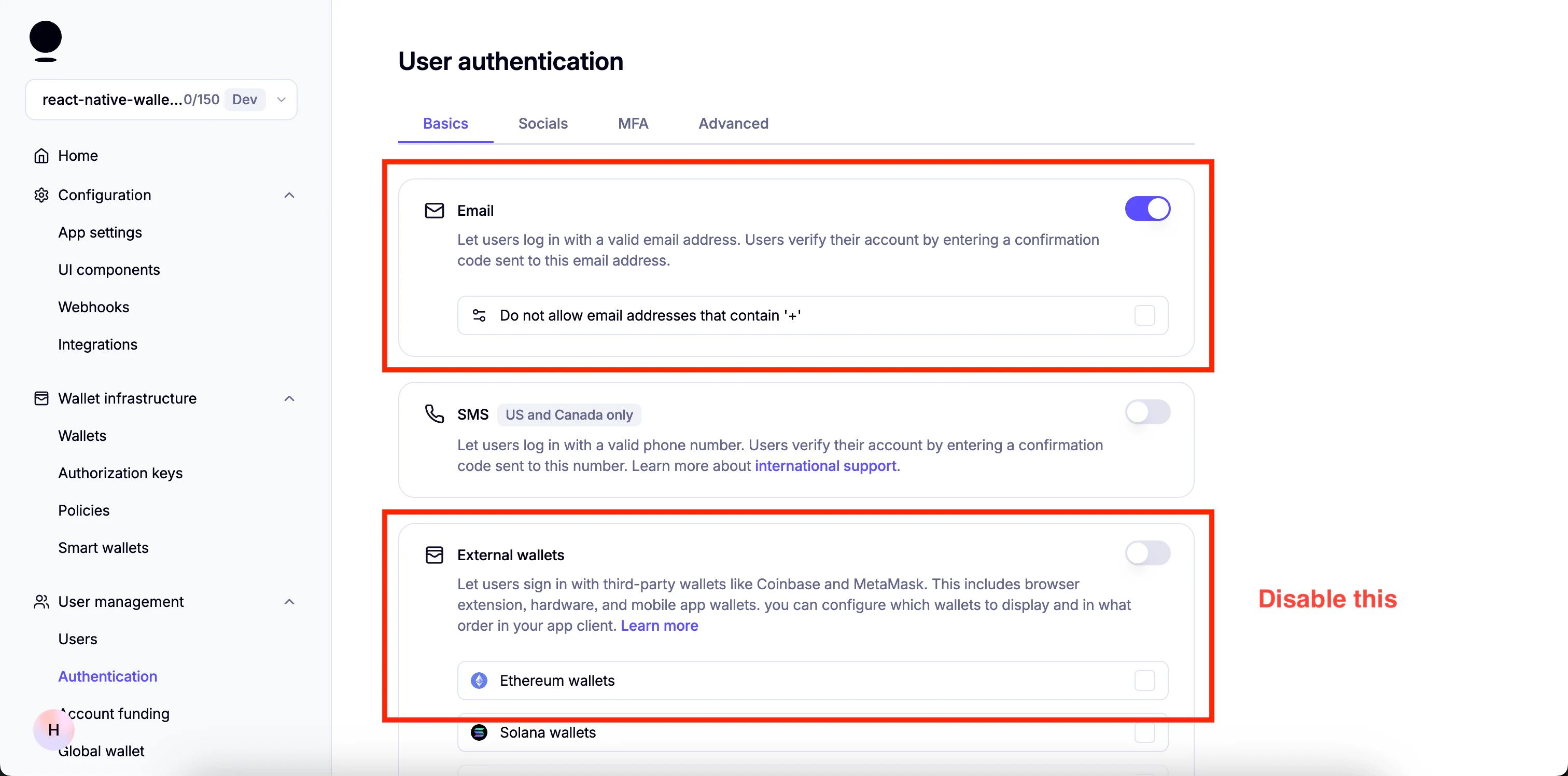
4. Enable "Automatically create embedded wallets on login" and select "EVM Wallets":
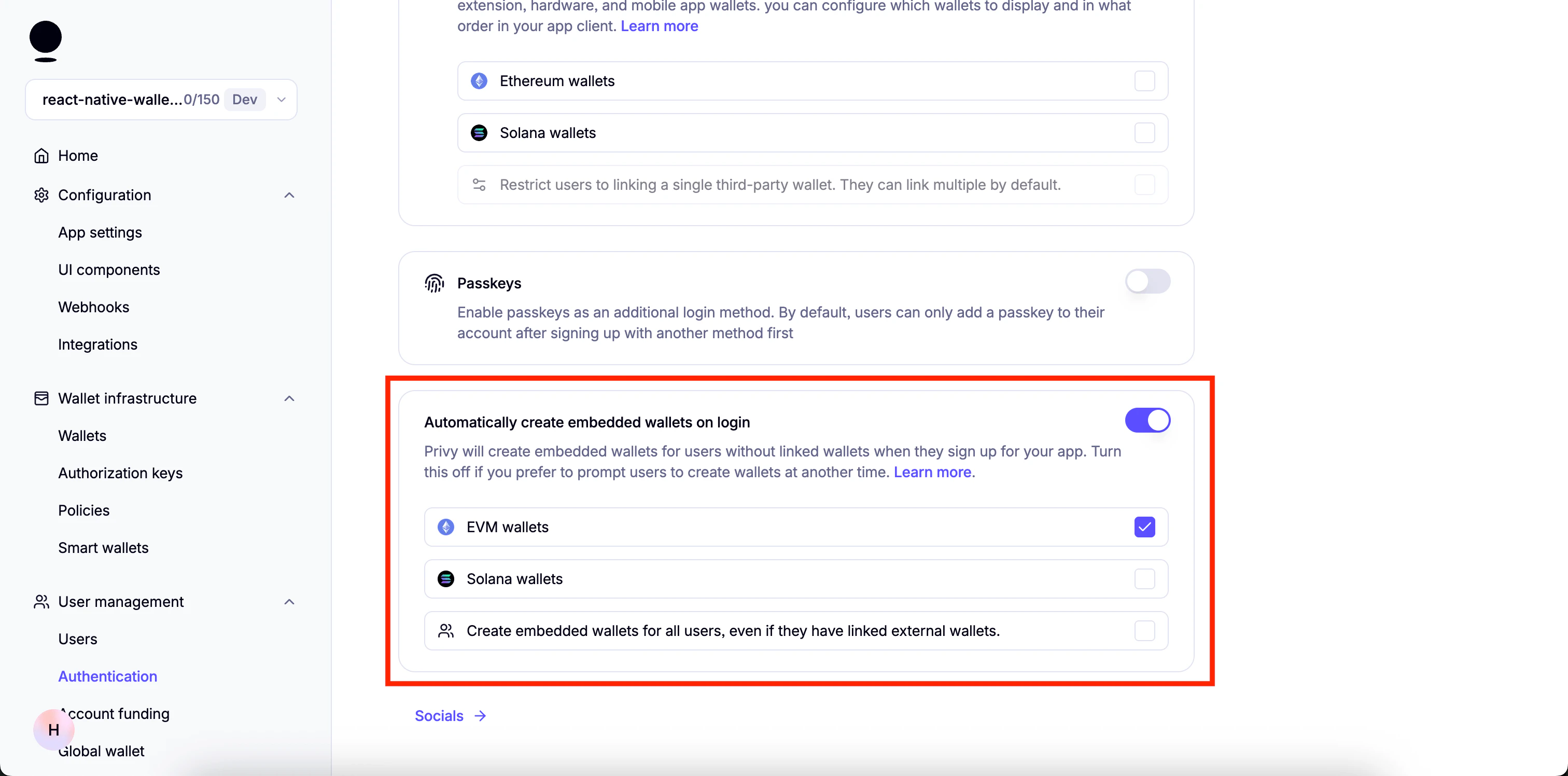
5. Disable everything in Socials.
6. Go to "Advanced" and Make sure only "Web2: Email, SMS, and socials" under "Prioritize options displayed" is enabled:
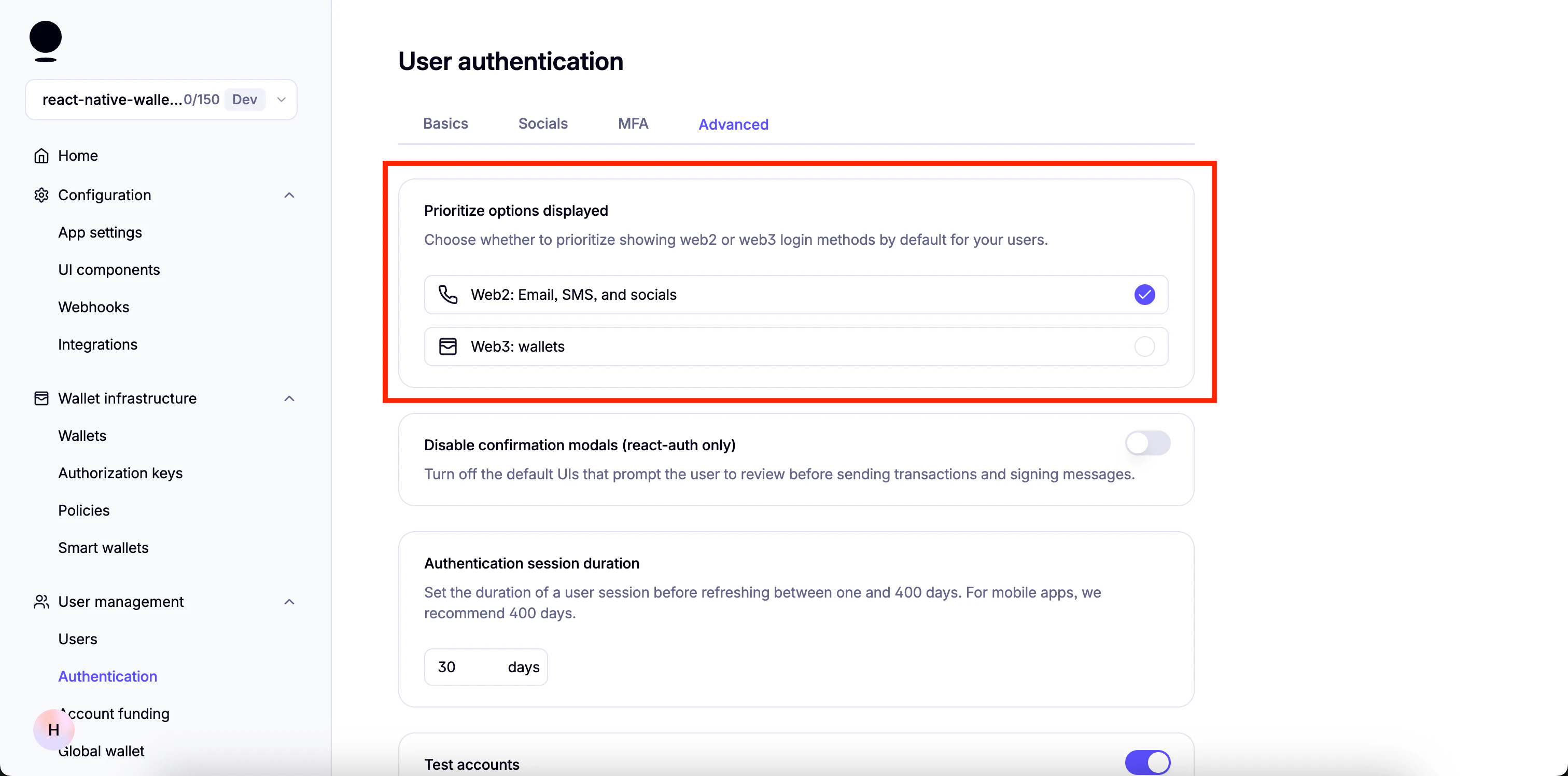
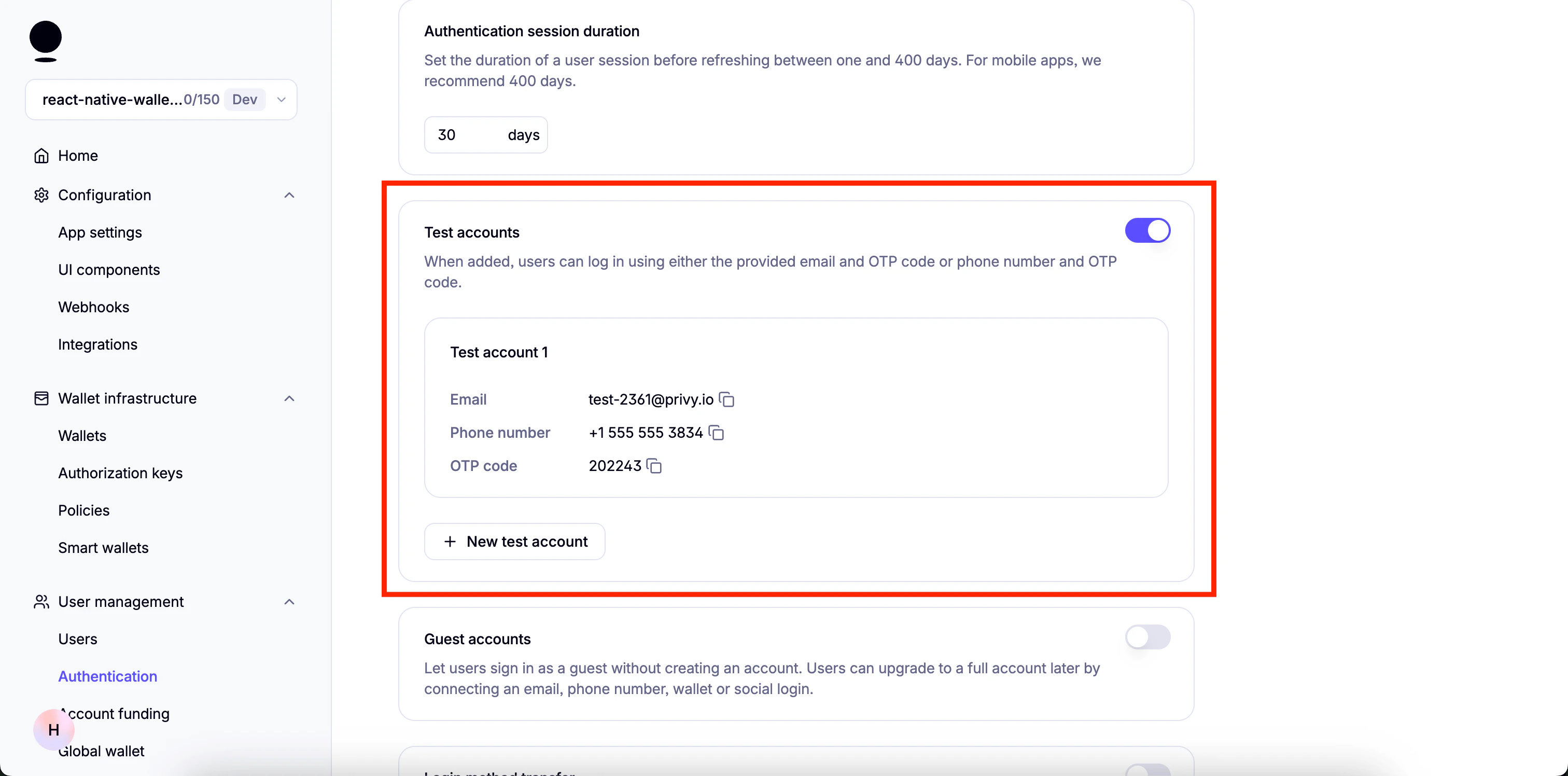
You can enable "Test Accounts" for testing purposes
 A few more steps are required but we will continue once the dependencies for the project are installed.
## Get started
This template also has a `demo` branch that you can switch to in order to view the demo project.
You can switch using the following command:
```
git checkout demo
```
### Install dependencies
```bash theme={null}
npm install
```
### Set up the environment variables
* Create a copy of `.env.example`:
```bash theme={null}
cp .env.example .env
```
* Add the following environment variables to it
```
EXPO_PUBLIC_PRIVY_APP_ID=
EXPO_PUBLIC_PRIVY_CLIENT_ID=
EXPO_PUBLIC_PIMLICO_BUNDLER_URL=
```
1. Go to your Privy Dashboard and click on `Home` for your Privy app and click on `Retrieve API keys`.
A few more steps are required but we will continue once the dependencies for the project are installed.
## Get started
This template also has a `demo` branch that you can switch to in order to view the demo project.
You can switch using the following command:
```
git checkout demo
```
### Install dependencies
```bash theme={null}
npm install
```
### Set up the environment variables
* Create a copy of `.env.example`:
```bash theme={null}
cp .env.example .env
```
* Add the following environment variables to it
```
EXPO_PUBLIC_PRIVY_APP_ID=
EXPO_PUBLIC_PRIVY_CLIENT_ID=
EXPO_PUBLIC_PIMLICO_BUNDLER_URL=
```
1. Go to your Privy Dashboard and click on `Home` for your Privy app and click on `Retrieve API keys`.
 2. You will find `App ID` under `API keys`.
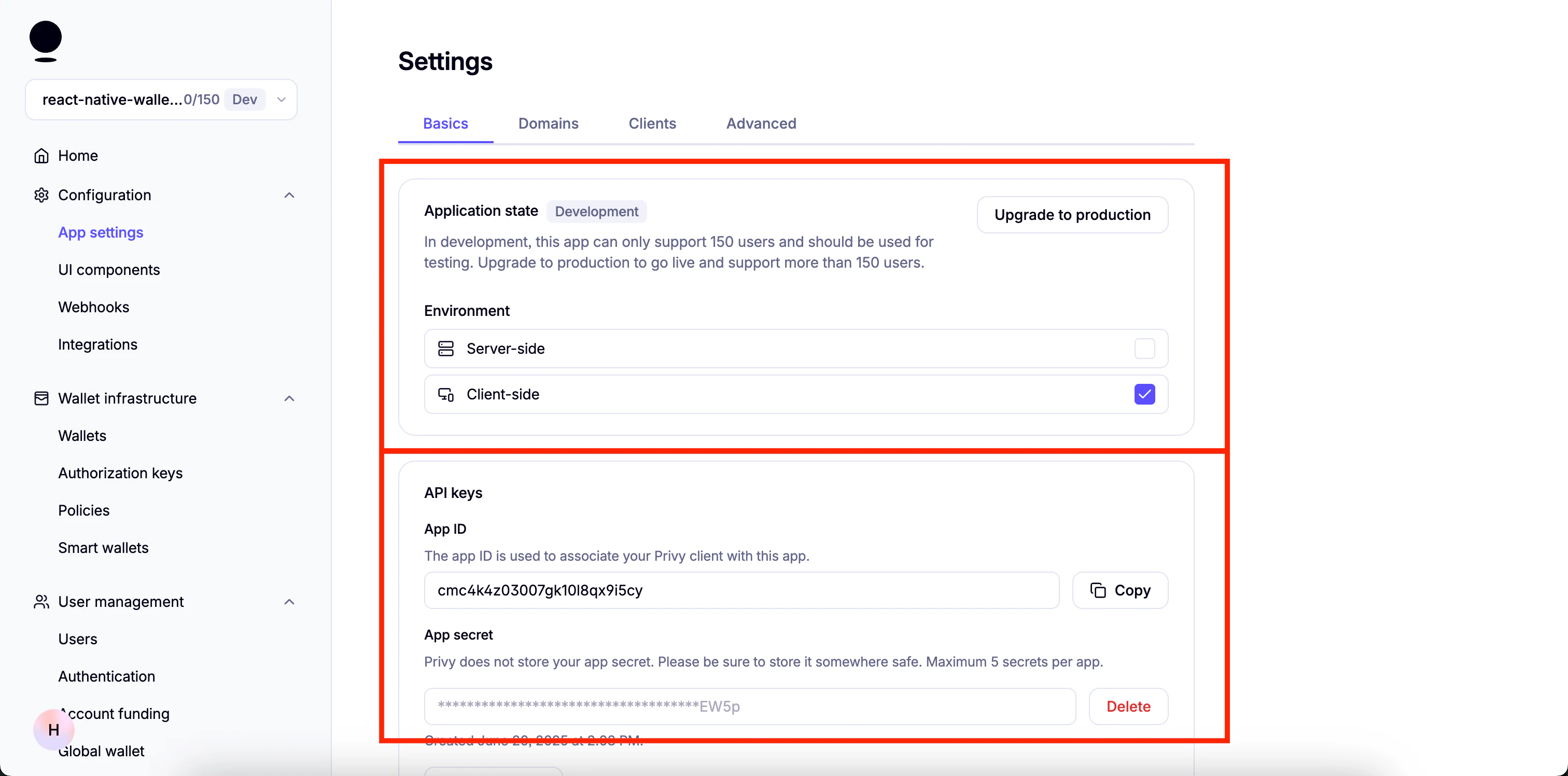 1. Go to your Privy Dashboard, click `Home` for your Privy app, and click `Retrieve API keys`.
2. Click on the `Clients` tab at the top, then click `Edit`.
1. Go to your Privy Dashboard, click `Home` for your Privy app, and click `Retrieve API keys`.
2. Click on the `Clients` tab at the top, then click `Edit`.
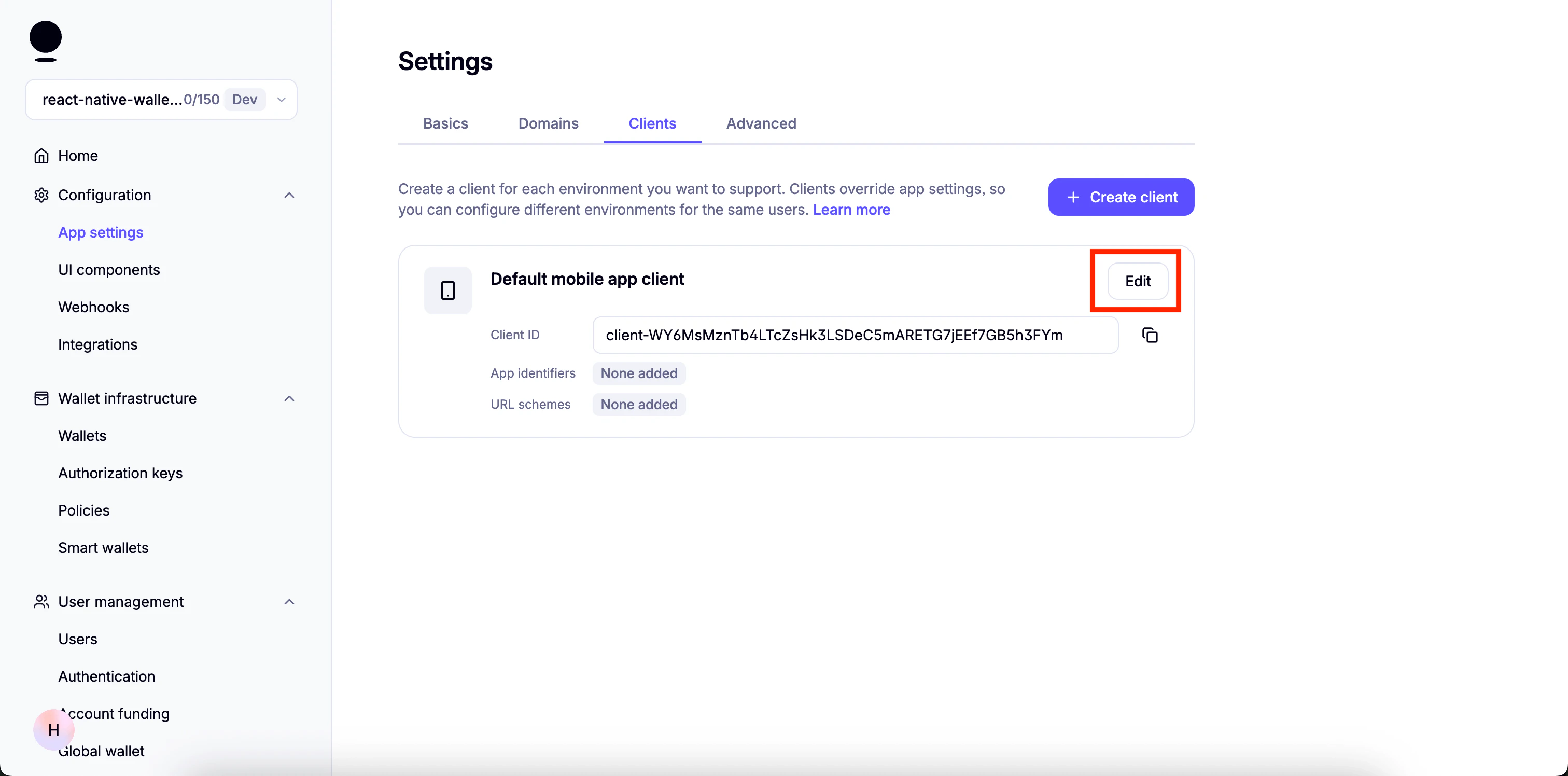 3. Under `Allowed app identifiers`, paste the name of the app bundle and click `Add`.
You will find the app bundle name in [`app.json`](https://github.com/monad-developers/react-native-privy-pimlico-gas-sponsorship-template/blob/main/app.json). For Android, it is the `package` property. For iOS, it is the `bundleIdentifier` property.
3. Under `Allowed app identifiers`, paste the name of the app bundle and click `Add`.
You will find the app bundle name in [`app.json`](https://github.com/monad-developers/react-native-privy-pimlico-gas-sponsorship-template/blob/main/app.json). For Android, it is the `package` property. For iOS, it is the `bundleIdentifier` property.
 4. Copy the `Client ID` and use it as the value for `EXPO_PUBLIC_PRIVY_CLIENT_ID`.
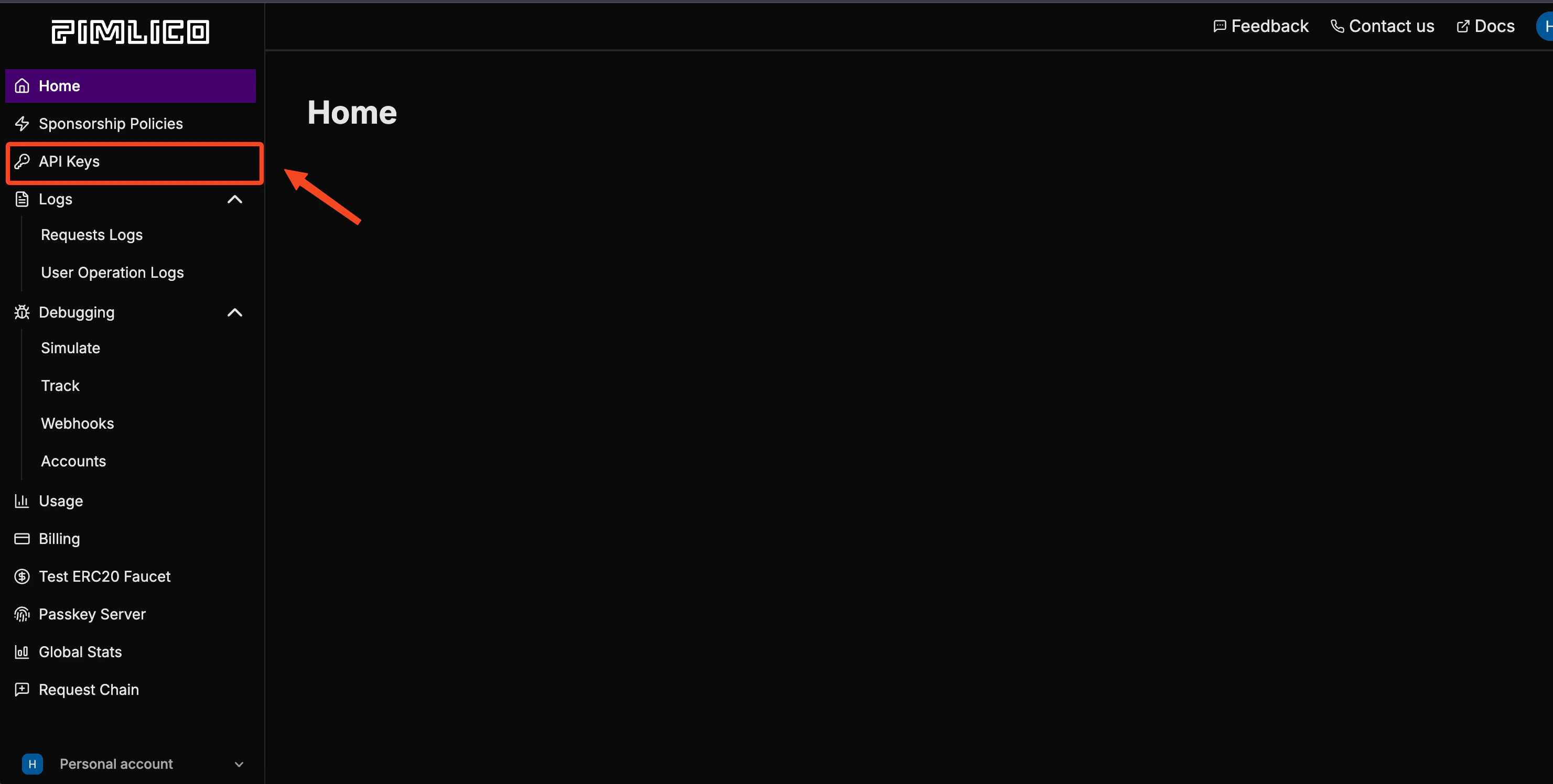
 1. Sign up on Pimlico and go to "API Keys":
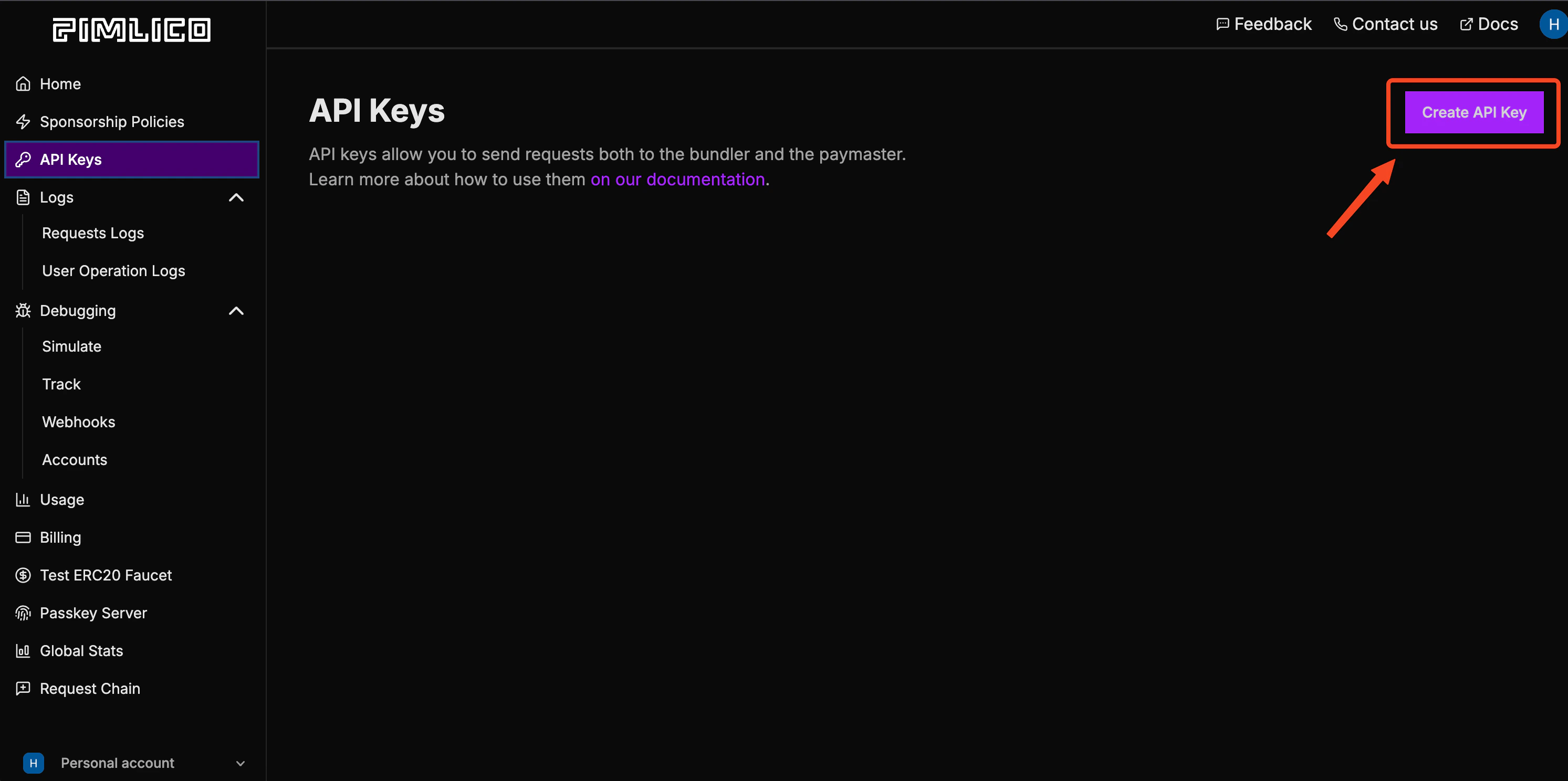
 2. Create a new API key:
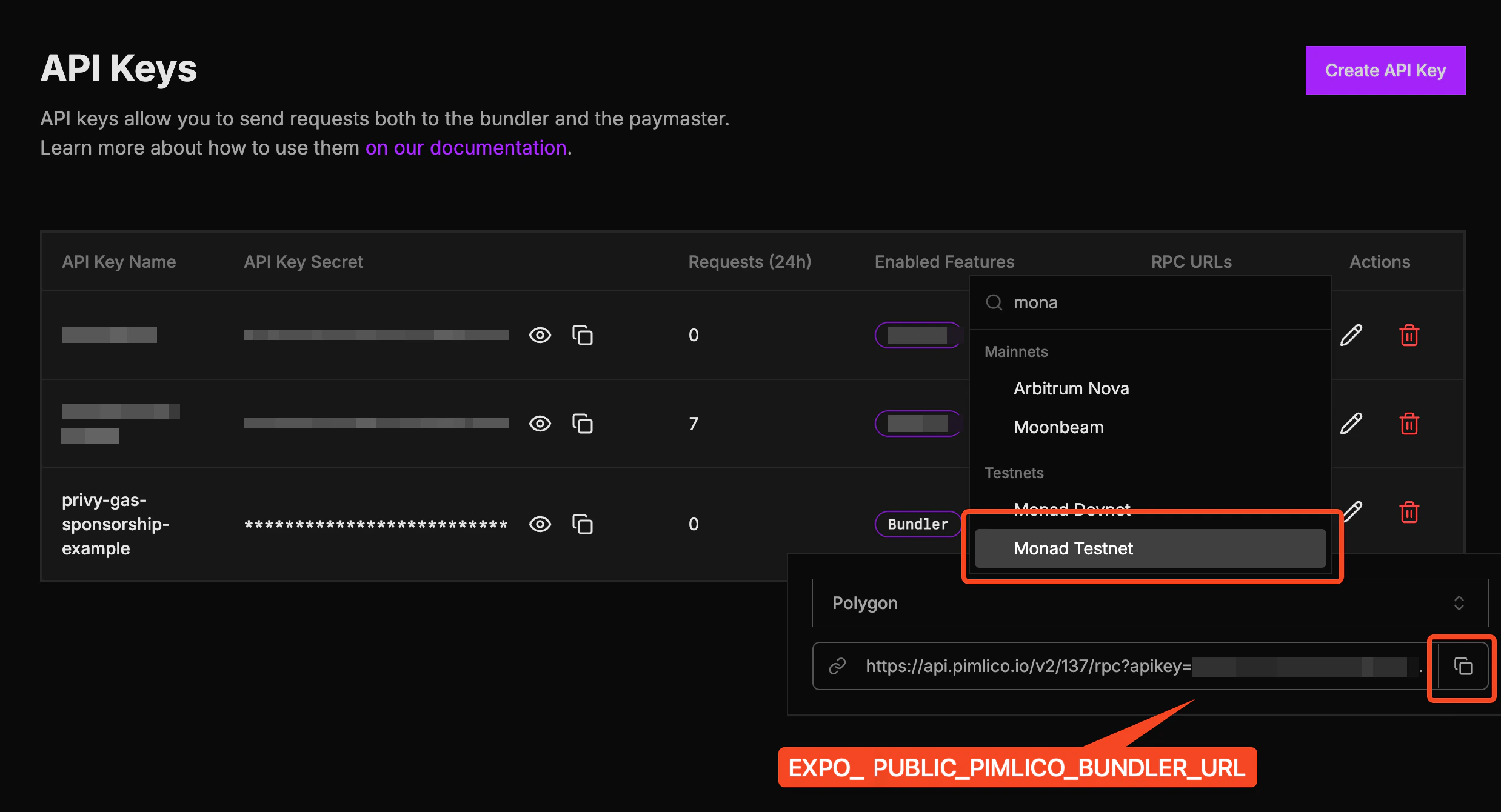
 3. Click on "RPC URLs":
 4. Search for Monad Testnet and copy the URL. Use this as `EXPO_PUBLIC_PIMLICO_BUNDLER_URL`:
 ### Start the app
Start the app either in the Expo Go app, or natively.
In the Expo Go app:
* For iOS:
```bash theme={null}
npm run ios
```
* For Android:
```bash theme={null}
npm run android
```
As a native app build:
* For iOS:
```bash theme={null}
npx expo run:ios
```
* For Android:
```bash theme={null}
npx expo run:android
```
## Template folder structure
```
react-native-privy-pimlico-gas-sponsorship-template/
├── app/ # Expo router entrypoint
│ ├── _layout.tsx # Root layout
│ └── index.tsx # First screen
├── assets/
│ ├── images/
│ │ ├── adaptive-icon.png
│ │ ├── favicon.png
│ │ ├── icon.png
│ │ ├── monad-logo-inverted.png
│ │ └── monad-logo.png
│ └── readme/
├── constants/
│ └── Colors.ts
├── hooks/
│ └── useSmartWallet.tsx # Smart wallet utilities
├── screens/
│ └── Home.tsx # Start here
├── types/
│ └── react-native-qrcode-styled.d.ts
├── app.json # App properties
├── babel.config.js
├── eas.json
├── entrypoint.js
├── eslint.config.js
├── metro.config.js # Configuration for Hermes and Polyfills
├── package-lock.json
├── package.json
├── README.md
└── tsconfig.json
```
## Send sponsored transactions
Below is an example of how to use the [useSmartWallet](https://github.com/monad-developers/react-native-privy-pimlico-gas-sponsorship-template/blob/main/hooks/useSmartWallet.tsx) hook to send sponsored transactions. You can either modify the code to send your own transactions or integrate it into your existing project.
```ts theme={null}
...
// Use `useSmartWallets` hook
const { smartAccountAddress, smartAccountClient, smartAccountReady } = useSmartWallet();
...
// Send sponsored transaction
const txHash = await smartAccountClient?.sendTransaction({
account: smartAccountClient?.account,
chain: monadTestnet,
to: NFT_CONTRACT_ADDRESS,
data,
});
...
```
### Send batch sponsored transactions
You can also send batches of sponsored transactions:
```ts theme={null}
const txHash = await smartAccountClient?.sendTransaction({
calls: [
{
to: NFT_CONTRACT_ADDRESS,
data,
},
{
to: NFT_CONTRACT_ADDRESS,
data,
},
],
});
```
This example uses the Kernel smart account with Entrypoint v7. See [`useSmartWallet.tsx`](https://github.com/monad-developers/react-native-privy-pimlico-gas-sponsorship-template/blob/main/hooks/useSmartWallet.tsx) to inspect the implementation details.
## Modify the app name
### Start the app
Start the app either in the Expo Go app, or natively.
In the Expo Go app:
* For iOS:
```bash theme={null}
npm run ios
```
* For Android:
```bash theme={null}
npm run android
```
As a native app build:
* For iOS:
```bash theme={null}
npx expo run:ios
```
* For Android:
```bash theme={null}
npx expo run:android
```
## Template folder structure
```
react-native-privy-pimlico-gas-sponsorship-template/
├── app/ # Expo router entrypoint
│ ├── _layout.tsx # Root layout
│ └── index.tsx # First screen
├── assets/
│ ├── images/
│ │ ├── adaptive-icon.png
│ │ ├── favicon.png
│ │ ├── icon.png
│ │ ├── monad-logo-inverted.png
│ │ └── monad-logo.png
│ └── readme/
├── constants/
│ └── Colors.ts
├── hooks/
│ └── useSmartWallet.tsx # Smart wallet utilities
├── screens/
│ └── Home.tsx # Start here
├── types/
│ └── react-native-qrcode-styled.d.ts
├── app.json # App properties
├── babel.config.js
├── eas.json
├── entrypoint.js
├── eslint.config.js
├── metro.config.js # Configuration for Hermes and Polyfills
├── package-lock.json
├── package.json
├── README.md
└── tsconfig.json
```
## Send sponsored transactions
Below is an example of how to use the [useSmartWallet](https://github.com/monad-developers/react-native-privy-pimlico-gas-sponsorship-template/blob/main/hooks/useSmartWallet.tsx) hook to send sponsored transactions. You can either modify the code to send your own transactions or integrate it into your existing project.
```ts theme={null}
...
// Use `useSmartWallets` hook
const { smartAccountAddress, smartAccountClient, smartAccountReady } = useSmartWallet();
...
// Send sponsored transaction
const txHash = await smartAccountClient?.sendTransaction({
account: smartAccountClient?.account,
chain: monadTestnet,
to: NFT_CONTRACT_ADDRESS,
data,
});
...
```
### Send batch sponsored transactions
You can also send batches of sponsored transactions:
```ts theme={null}
const txHash = await smartAccountClient?.sendTransaction({
calls: [
{
to: NFT_CONTRACT_ADDRESS,
data,
},
{
to: NFT_CONTRACT_ADDRESS,
data,
},
],
});
```
This example uses the Kernel smart account with Entrypoint v7. See [`useSmartWallet.tsx`](https://github.com/monad-developers/react-native-privy-pimlico-gas-sponsorship-template/blob/main/hooks/useSmartWallet.tsx) to inspect the implementation details.
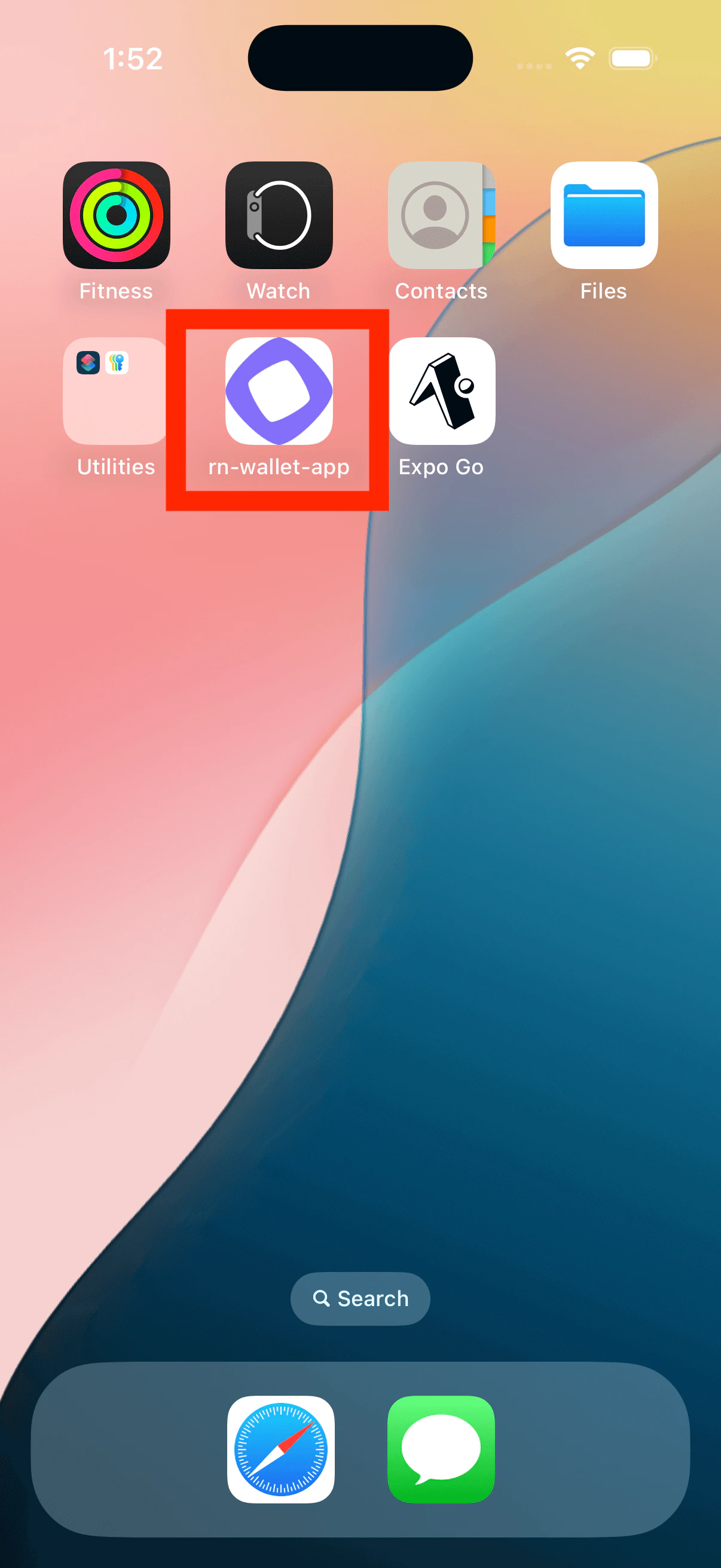
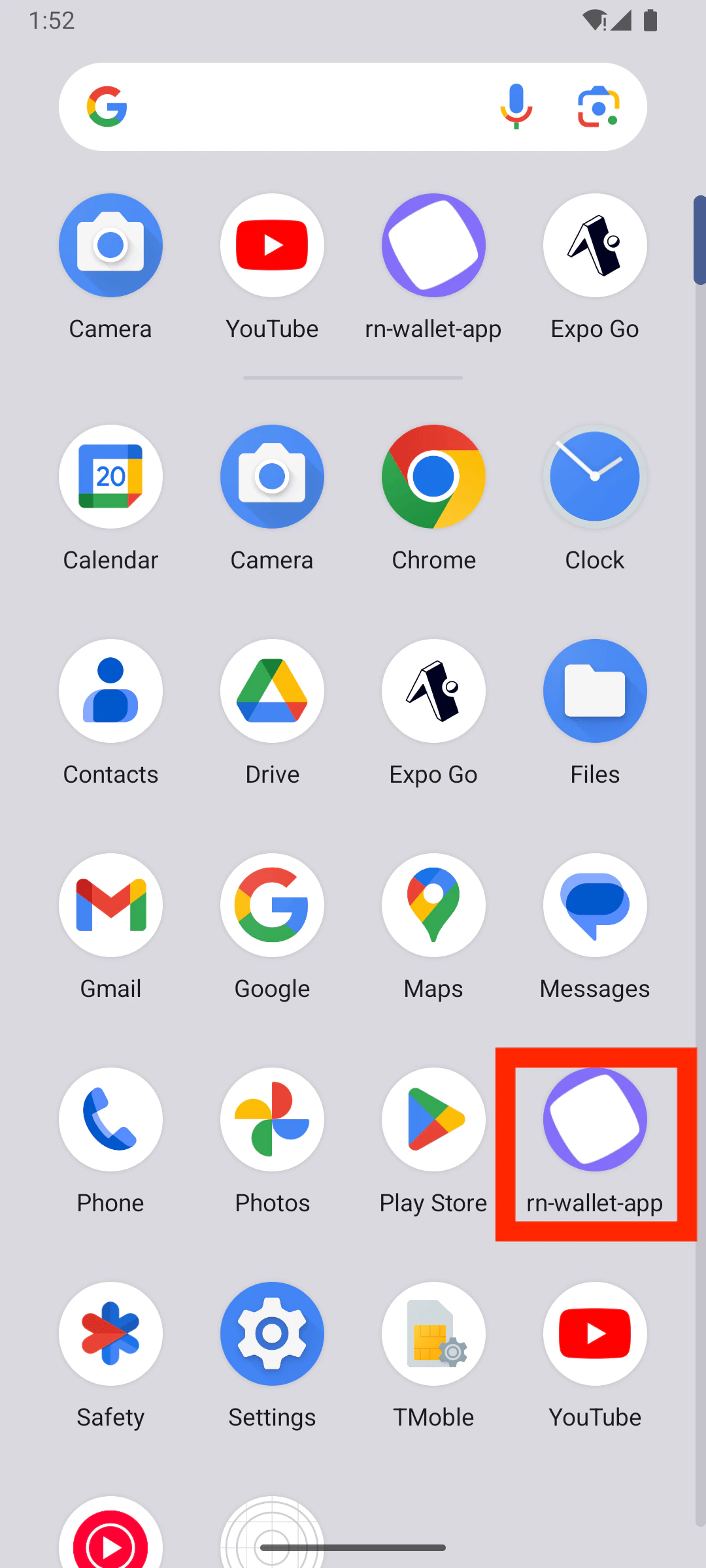
## Modify the app name
| iOS |
Android |
|
|
Edit the `name` property in [`app.json`](https://github.com/monad-developers/react-native-privy-pimlico-gas-sponsorship-template/blob/main/app.json):
```js title="app.json" theme={null}
{
"expo": {
"name": "wallet-app", <--- Edit this
...
}
}
```
## Modify the app icon and splash screen
### App icon
| iOS |
Android |
|
|
|
You can edit the app icon by replacing `assets/images/icon.png`.
Recommended app icon size is `1024x1024`.
If you name the icon file something else, then edit the `icon` property in [`app.json`](https://github.com/monad-developers/react-native-privy-pimlico-gas-sponsorship-template/blob/main/app.json) accordingly.
```json title="app.json" theme={null}
{
"expo": {
"name": "rn-wallet-app",
...
"icon": "./assets/images/icon.png", <--- Change this
...
}
}
```
### Splash screen
| iOS |
Android |
|
|
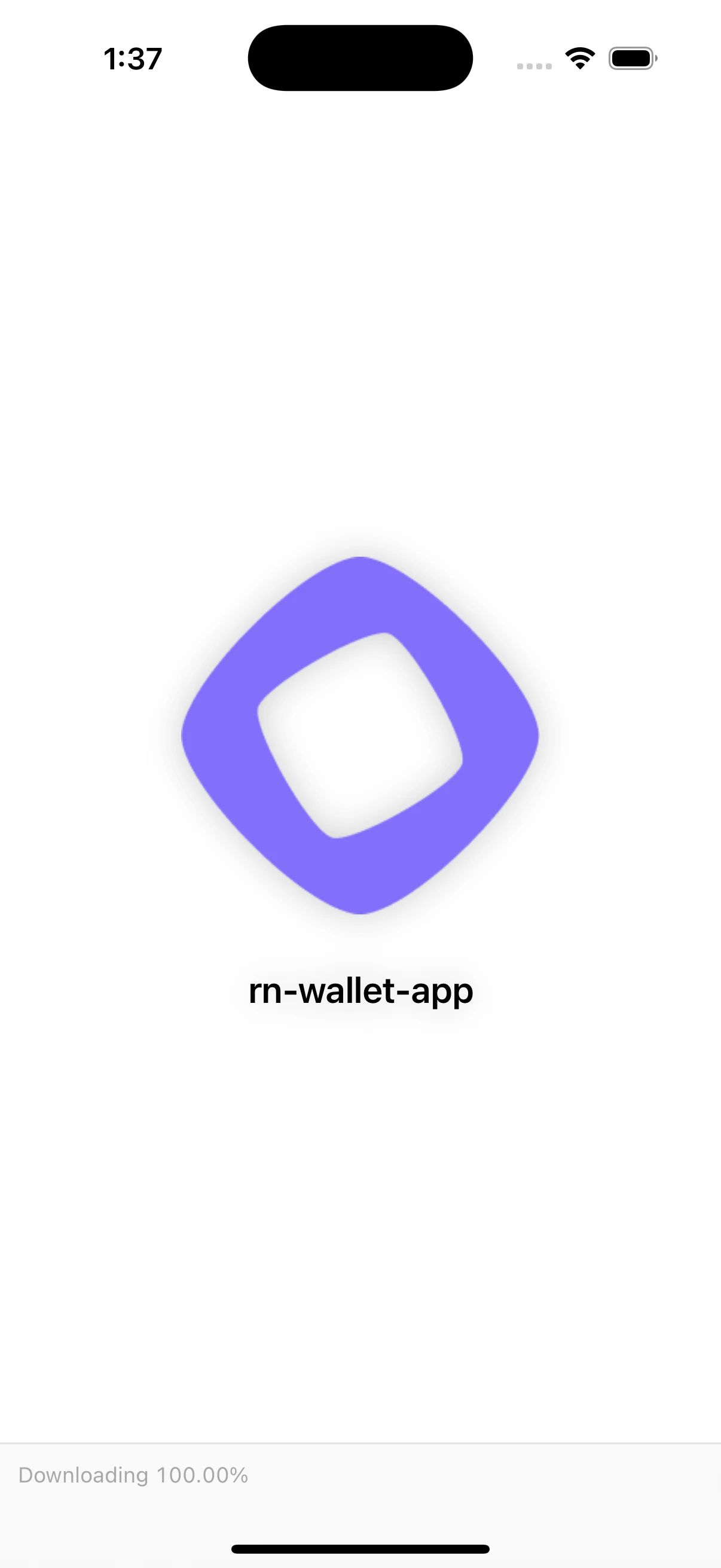
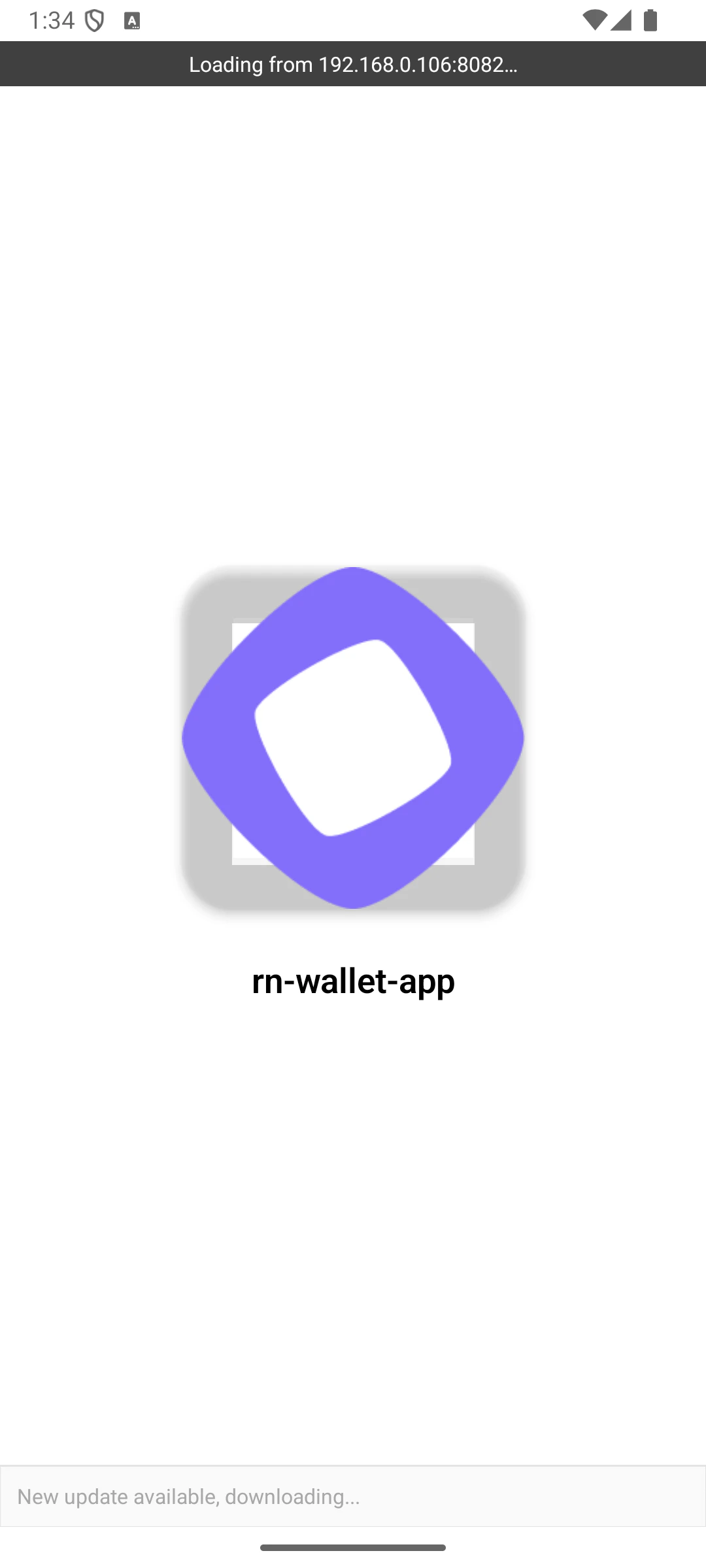
Edit the `splash` object in [`app.json`](https://github.com/monad-developers/react-native-privy-pimlico-gas-sponsorship-template/blob/main/app.json) to modify the splash screen.
```json title="app.json" theme={null}
{
"expo": {
"name": "rn-gas-sponsorship-app",
...
"splash": { <--- Edit this object
"image": "./assets/images/icon.png",
"backgroundColor": "#ffffff"
}
}
}
```
## Change fonts
You can create a `fonts` folder inside [`assets`](https://github.com/monad-developers/react-native-privy-pimlico-gas-sponsorship-template/tree/main/assets) to store your custom font files.
To use the custom font, load the font in [`app/_layout.tsx`](https://github.com/monad-developers/react-native-privy-pimlico-gas-sponsorship-template/blob/main/app/_layout.tsx).
Example:
```ts title="app/_layout.tsx" theme={null}
const [loaded] = useFonts({
"SF-Pro-Rounded-Black": require("../assets/fonts/SF_Pro_Rounded/SF-Pro-Rounded-Black.otf"),
"SF-Pro-Rounded-Bold": require("../assets/fonts/SF_Pro_Rounded/SF-Pro-Rounded-Bold.otf"),
"SF-Pro-Rounded-Heavy": require("../assets/fonts/SF_Pro_Rounded/SF-Pro-Rounded-Heavy.otf"),
"SF-Pro-Rounded-Medium": require("../assets/fonts/SF_Pro_Rounded/SF-Pro-Rounded-Medium.otf"),
"SF-Pro-Rounded-Regular": require("../assets/fonts/SF_Pro_Rounded/SF-Pro-Rounded-Regular.otf"),
"SF-Pro-Rounded-Semibold": require("../assets/fonts/SF_Pro_Rounded/SF-Pro-Rounded-Semibold.otf"),
Inter_400Regular,
Inter_500Medium,
Inter_600SemiBold,
});
```
## Modify the deeplinking scheme
Edit the `scheme` property in [`app.json`](https://github.com/monad-developers/react-native-privy-pimlico-gas-sponsorship-template/blob/main/app.json) to select your custom deeplinking scheme:
```json title="app.json" theme={null}
{
"expo": {
...
"scheme": "rnwalletapp",
...
}
}
```
For example, if you set this to `rnwalletapp`, then `rnwalletapp://` URLs would open your app when tapped.
This is a build-time configuration; it has no effect in Expo Go.
## Edit the landing screen
You can edit the landing page by editing [`screens/Home.tsx`](https://github.com/monad-developers/react-native-privy-pimlico-gas-sponsorship-template/blob/main/screens/Home.tsx).
In the `demo` branch, we ended up adding more complex functionality, which is why `Home.tsx` became a [folder](https://github.com/monad-developers/react-native-privy-pimlico-gas-sponsorship-template/tree/demo/screens/Home).
## Modify the package/bundle identifier
When publishing app to the app store, you need to have a unique package/bundle identifier, which you may set in [`app.json`](https://github.com/monad-developers/react-native-privy-pimlico-gas-sponsorship-template/blob/main/app.json).
Don't forget to change the identifier in Privy dashboard
```json title="app.json" theme={null}
{
"expo": {
"name": "rn-gas-sponsorship-app",
...
"ios": {
"bundleIdentifier": "com.anonymous.rn-wallet-app", <--- Edit this
...
},
"android": {
...
"package": "com.anonymous.rnwalletapp" <--- Edit this
},
}
}
```
## Check out the demo app
If you'd like to try a completed version of the app before you start developing, switch to the `demo` branch:
```bash theme={null}
git checkout demo
```
### Demo app folder structure
```
react-native-privy-pimlico-gas-sponsorship-template/
├── app/
│ ├── _layout.tsx # Root layout of the project
│ └── index.tsx # This is the landing page
│ └── sign-in/ # Unauthenticated user gets redirected to /sign-in
├── assets/
│ ├── fonts/ # Custom fonts go here
│ │ └── SF_Pro_Rounded/ # Custom font example
│ └── images/
│ ├── adaptive-icon.png
│ ├── favicon.png
│ ├── icon.png
│ ├── monad-icon.png
│ ├── monad-logo-inverted.png
│ ├── monad-logo.png
│ ├── partial-react-logo.png
│ └── splash-icon.png
├── components/
│ └── ui/
├── constants/
│ ├── abi.json # NFT smart contract ABI
├── context/
│ ├── AuthContext.tsx
├── hooks/
│ ├── useSmartWallet.tsx # Hook with smart wallet related functions
├── screens/
│ ├── Email/ # Screen that asks for email
│ ├── Home/ # NFT minting screen (Authenticated users only)
│ └── OTP/ # Screen that asks for the OTP code sent to email
├── types/
├── utils.ts
├── entrypoint.js
├── app.json
├── babel.config.js
├── eas.json
├── eslint.config.js
├── metro.config.js
├── package.json
├── package-lock.json
├── README.md
├── tsconfig.json
```
## Learn more
To learn more about developing your project with Expo, Privy, and Monad, check out the following resources:
* Expo [docs](https://docs.expo.dev/) | [guides](https://docs.expo.dev/guides) | [tutorial](https://docs.expo.dev/tutorial/introduction/)
* Privy: [create a wallet](https://docs.privy.io/wallets/wallets/create/create-a-wallet) | [send a transaction](https://docs.privy.io/wallets/using-wallets/ethereum/send-a-transaction) | [sign a transaction](https://docs.privy.io/wallets/using-wallets/ethereum/sign-a-transaction)
* Permissionless: [smart wallet client](https://docs.pimlico.io/references/permissionless/reference/clients/smartAccountClient) | [sending transactions](https://docs.pimlico.io/references/permissionless/reference/smart-account-actions/sendTransaction)
* Monad: [supported tooling and infra](/tooling-and-infra)
Please report any issues [here](https://github.com/monad-developers/react-native-privy-pimlico-gas-sponsorship-template/issues).