> ## Documentation Index
> Fetch the complete documentation index at: https://docs.monad.xyz/llms.txt
> Use this file to discover all available pages before exploring further.
# How to use the React Native Thirdweb embedded wallet template
This guide walks you through using the [embedded wallet template](https://github.com/monad-developers/expo-thirdweb-example) which uses [Expo](https://expo.dev/), [React Native](https://reactnative.dev/), and [Thirdweb embedded wallet](https://thirdweb.com/in-app-wallets) to build a mobile app on Monad.
Start developing by editing the files inside the [`app`](https://github.com/monad-developers/expo-thirdweb-example/tree/main/app) directory. This project uses [file-based routing](https://docs.expo.dev/router/introduction).
## Prerequisites
* Node.js
* Yarn or NPM
* a [thirdweb account](https://thirdweb.com/login)
- JDK 17 (Java Development Kit version 17)
* Set the `JAVA_HOME` environment variable to point to your JDK 17 installation
* Example: `export JAVA_HOME=/Library/Java/JavaVirtualMachines/microsoft-17.jdk/Contents/Home`
- [Android Studio](https://developer.android.com/studio) (API version 35 and above)
* See [this](https://docs.expo.dev/workflow/android-studio-emulator/) guide to set up Android Studio for Expo
* Configure Gradle JDK in Android Studio:
* Open Android Studio Settings/Preferences
* Navigate to Build, Execution, Deployment → Build Tools → Gradle
* Set Gradle JDK to JDK 17 (e.g., `JAVA_HOME 17.0.13` - `aarch64 /Library/Java/JavaVirtualMachines/microsoft-17.jdk/Contents/Home`)
* [Xcode](https://apps.apple.com/in/app/xcode/id497799835?mt=12) (Xcode 16 requires OpenSSL version 3.3.2000)
* See [this](https://docs.expo.dev/workflow/ios-simulator/) guide to set up iOS Simulator for Expo
## Get started
### Install dependencies
```bash theme={null}
yarn install
```
### Set up the environment variables
Create a copy of `.env.example`:
```bash theme={null}
cp .env.example .env
```
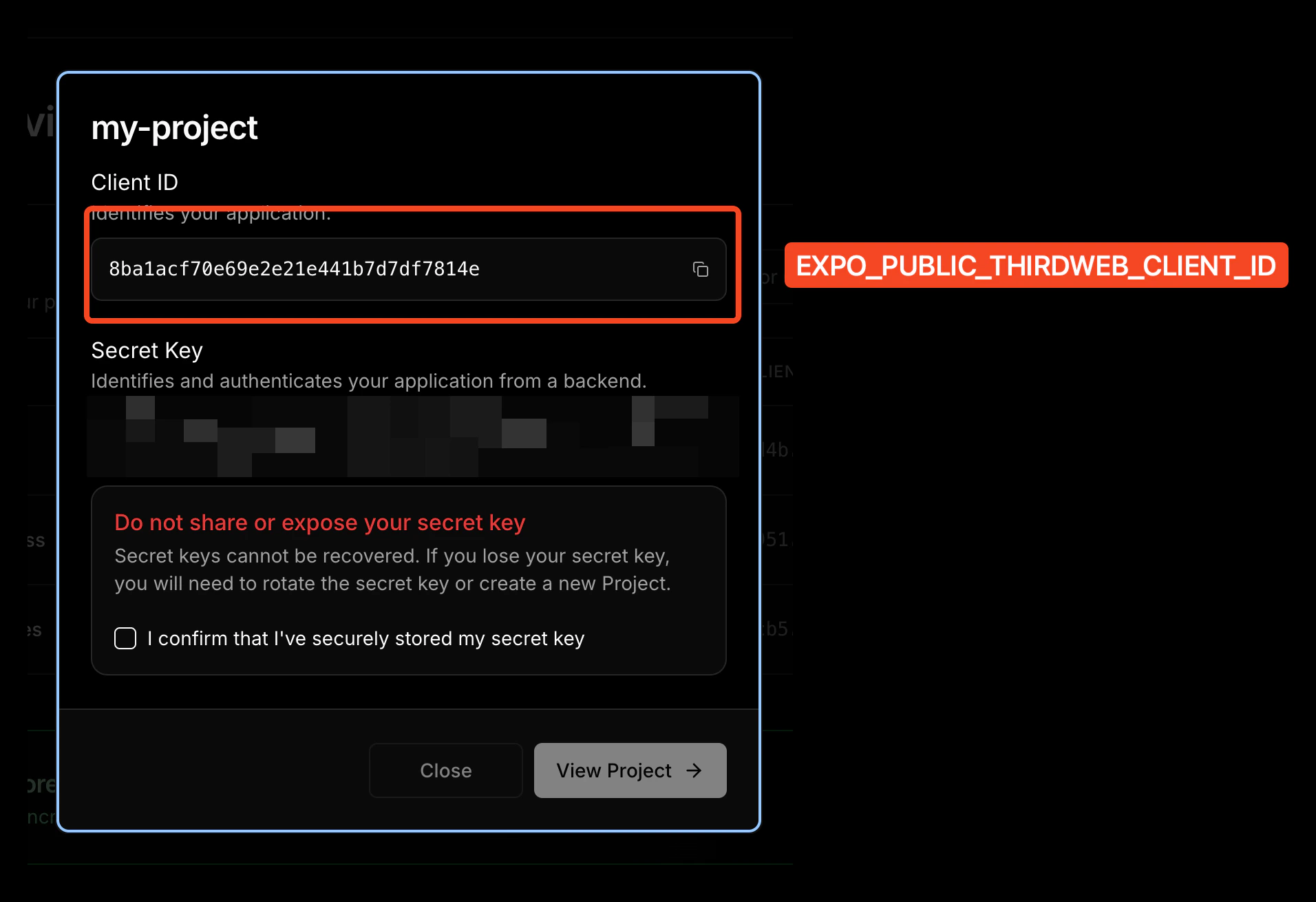
Add your thirdweb client ID to the `.env` file:
```
EXPO_PUBLIC_THIRDWEB_CLIENT_ID=your_client_id_here
```
1. Navigate to [thirdweb dashboard](https://thirdweb.com/dashboard)
2. Sign in or create a new account
3. Create a new project

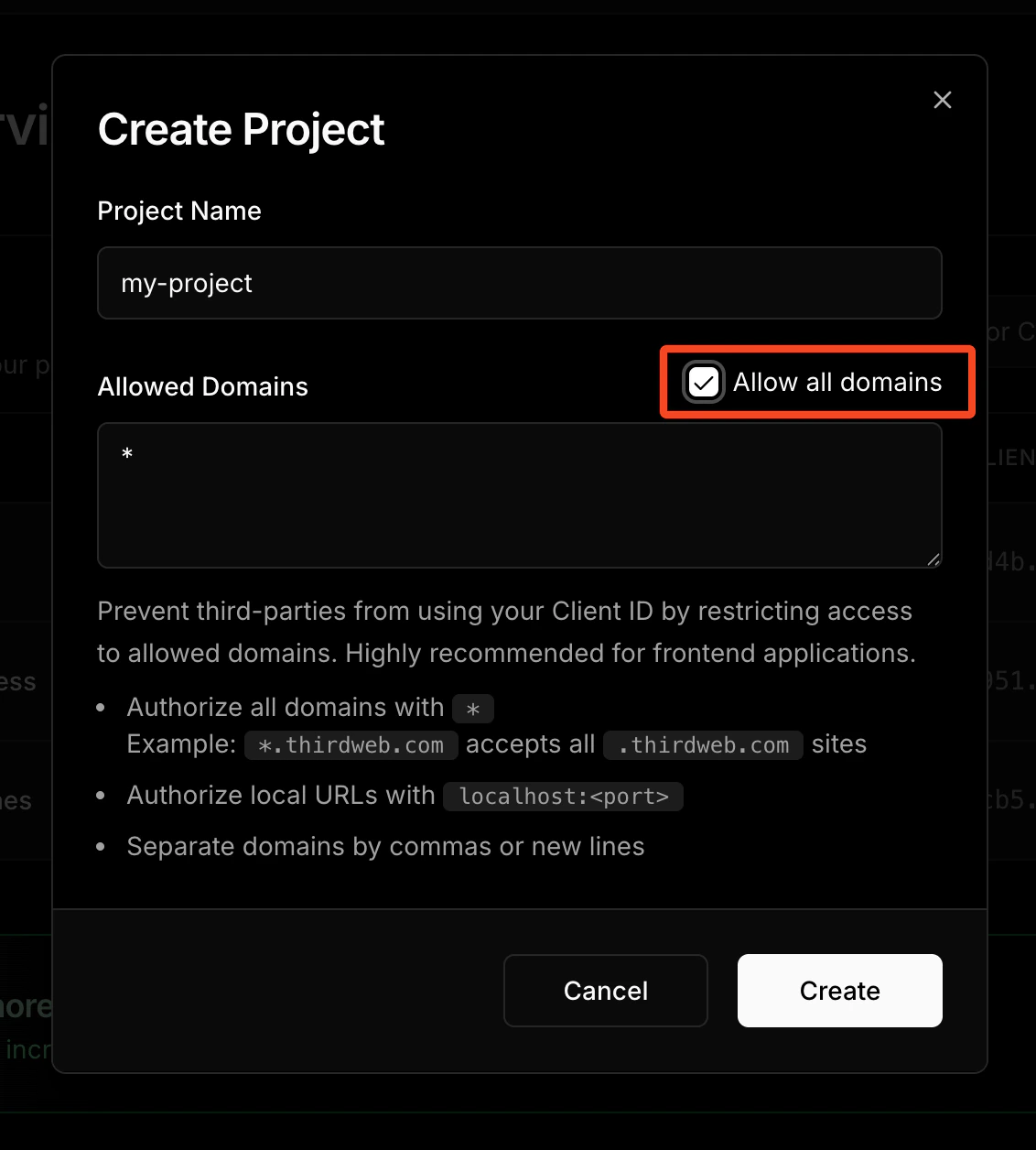 4. Copy your Client ID from the project settings; Client ID is the value for `EXPO_PUBLIC_THIRDWEB_CLIENT_ID`.
 ## Start the app
This template comes with a simple transfer example screen, which you can edit by editing the [`index.tsx`](https://github.com/monad-developers/expo-thirdweb-example/blob/main/app/index.tsx) file in the [`app`](https://github.com/monad-developers/expo-thirdweb-example/tree/main/app) folder.
### Prebuild for native modules
The thirdweb SDK uses native modules, which means it cannot run on Expo Go. You must build the iOS and Android apps to link the native modules.
```bash theme={null}
npx expo prebuild
```
For iOS:
```bash theme={null}
yarn ios
```
For Android:
```bash theme={null}
yarn android
```
## Folder structure of the template
```
expo-thirdweb-example/
├── app/ # Expo router entrypoint
│ ├── +html.tsx # Web HTML configuration
│ ├── +native-intent.tsx # Deep link handling
│ ├── +not-found.tsx # 404 page
│ ├── _layout.tsx # Root layout with ThirdwebProvider
│ └── index.tsx # Main screen
├── assets/
│ ├── fonts/ # Custom fonts
│ └── images/ # App images and icons
│ ├── adaptive-icon.png
│ ├── icon.png
│ ├── monad-logo.png
│ └── splash.png
├── components/ # Reusable UI components
│ ├── ThemedButton.tsx # Themed button component
│ ├── ThemedText.tsx # Themed text component
│ ├── ThemedView.tsx # Themed view component
│ ├── SocialProfileCard.tsx # Social profile display
│ └── navigation/
│ └── TabBarIcon.tsx # Tab bar icons
├── constants/
│ ├── Colors.ts # App color scheme
│ └── thirdweb.ts # Blockchain configuration
├── hooks/ # Custom React hooks
│ ├── useColorScheme.ts # Theme detection
│ └── useThemeColor.ts # Theme color utilities
├── app.json # Expo app configuration
├── babel.config.js
├── metro.config.js # Metro bundler config
├── package.json
├── tsconfig.json
└── yarn.lock
```
## Customizing your app
### Modifying the app name
Edit the `name` property in the [`app.json`](https://github.com/monad-developers/expo-thirdweb-example/blob/main/app.json) file:
```json theme={null}
{
"expo": {
"name": "your-app-name", // ← Edit this
...
}
}
```
### Modifying the app icon
You can edit the app icon by replacing the [`assets/images/icon.png`](https://github.com/monad-developers/expo-thirdweb-example/blob/main/assets/images/icon.png) file.
Recommended App Icon size is `1024x1024`.
If you name the icon file something else, edit the `icon` property in [`app.json`](https://github.com/monad-developers/expo-thirdweb-example/blob/main/app.json) accordingly:
```json theme={null}
{
"expo": {
"name": "your-app-name",
...
"icon": "./assets/images/icon.png", // ← Change this
...
}
}
```
### Modifying the splash screen
Edit the `splash` object in [`app.json`](https://github.com/monad-developers/expo-thirdweb-example/blob/main/app.json) to modify the splash screen:
```json theme={null}
{
"expo": {
"name": "your-app-name",
...
"splash": { // ← Edit this object
"image": "./assets/images/splash.png",
"backgroundColor": "#ffffff"
}
}
}
```
### Modifying the deep linking scheme
Edit the `scheme` property in [`app.json`](https://github.com/monad-developers/expo-thirdweb-example/blob/main/app.json) file for your custom deep linking scheme:
```json theme={null}
{
"expo": {
...
"scheme": "your-app-scheme",
...
}
}
```
For example, if you set this to `mywalletapp`, then `mywalletapp://` URLs would open your app when tapped.
This is a build-time configuration and has no effect in Expo Go.
### Modifying the `package`/`bundleIdentifier`
When publishing to the app store, you need a unique `package`/`bundleIdentifier`. Change it in [`app.json`](https://github.com/monad-developers/expo-thirdweb-example/blob/main/app.json):
```json theme={null}
{
"expo": {
"name": "your-app-name",
...
"ios": {
"bundleIdentifier": "com.yourcompany.yourapp", // ← Edit this
...
},
"android": {
...
"package": "com.yourcompany.yourapp" // ← Edit this
},
}
}
```
**thirdweb Bundle ID Configuration**: Your `bundleIdentifier` and `package` must match the Bundle ID Restrictions configured in your thirdweb project settings.
1. Go to the [thirdweb dashboard](https://thirdweb.com/dashboard)
2. Select your project
3. Navigate to Settings → Bundle ID Restrictions
4. Add your iOS `bundleIdentifier` and Android `package` to the allowed bundle IDs
This ensures your app can properly authenticate with thirdweb services.
## Learn More
To learn more about developing your project with [Expo](https://expo.dev/), [thirdweb](https://thirdweb.com/in-app-wallets), and [Monad](https://monad.xyz), look at the following resources:
* Expo: [documentation](https://docs.expo.dev/) | [guides](https://docs.expo.dev/guides) | [tutorial](https://docs.expo.dev/tutorial/introduction/)
* thirdweb: [documentation](https://portal.thirdweb.com/typescript/v5) | [templates](https://thirdweb.com/templates) | [YouTube](https://www.youtube.com/c/thirdweb)
* Monad: [supported tooling and infra](https://docs.monad.xyz/tooling-and-infra/)
### Join the Community
Chat with fellow Monad developers and ask questions in [Monad Developer Discord](https://discord.com/invite/monaddev)
## Start the app
This template comes with a simple transfer example screen, which you can edit by editing the [`index.tsx`](https://github.com/monad-developers/expo-thirdweb-example/blob/main/app/index.tsx) file in the [`app`](https://github.com/monad-developers/expo-thirdweb-example/tree/main/app) folder.
### Prebuild for native modules
The thirdweb SDK uses native modules, which means it cannot run on Expo Go. You must build the iOS and Android apps to link the native modules.
```bash theme={null}
npx expo prebuild
```
For iOS:
```bash theme={null}
yarn ios
```
For Android:
```bash theme={null}
yarn android
```
## Folder structure of the template
```
expo-thirdweb-example/
├── app/ # Expo router entrypoint
│ ├── +html.tsx # Web HTML configuration
│ ├── +native-intent.tsx # Deep link handling
│ ├── +not-found.tsx # 404 page
│ ├── _layout.tsx # Root layout with ThirdwebProvider
│ └── index.tsx # Main screen
├── assets/
│ ├── fonts/ # Custom fonts
│ └── images/ # App images and icons
│ ├── adaptive-icon.png
│ ├── icon.png
│ ├── monad-logo.png
│ └── splash.png
├── components/ # Reusable UI components
│ ├── ThemedButton.tsx # Themed button component
│ ├── ThemedText.tsx # Themed text component
│ ├── ThemedView.tsx # Themed view component
│ ├── SocialProfileCard.tsx # Social profile display
│ └── navigation/
│ └── TabBarIcon.tsx # Tab bar icons
├── constants/
│ ├── Colors.ts # App color scheme
│ └── thirdweb.ts # Blockchain configuration
├── hooks/ # Custom React hooks
│ ├── useColorScheme.ts # Theme detection
│ └── useThemeColor.ts # Theme color utilities
├── app.json # Expo app configuration
├── babel.config.js
├── metro.config.js # Metro bundler config
├── package.json
├── tsconfig.json
└── yarn.lock
```
## Customizing your app
### Modifying the app name
Edit the `name` property in the [`app.json`](https://github.com/monad-developers/expo-thirdweb-example/blob/main/app.json) file:
```json theme={null}
{
"expo": {
"name": "your-app-name", // ← Edit this
...
}
}
```
### Modifying the app icon
You can edit the app icon by replacing the [`assets/images/icon.png`](https://github.com/monad-developers/expo-thirdweb-example/blob/main/assets/images/icon.png) file.
Recommended App Icon size is `1024x1024`.
If you name the icon file something else, edit the `icon` property in [`app.json`](https://github.com/monad-developers/expo-thirdweb-example/blob/main/app.json) accordingly:
```json theme={null}
{
"expo": {
"name": "your-app-name",
...
"icon": "./assets/images/icon.png", // ← Change this
...
}
}
```
### Modifying the splash screen
Edit the `splash` object in [`app.json`](https://github.com/monad-developers/expo-thirdweb-example/blob/main/app.json) to modify the splash screen:
```json theme={null}
{
"expo": {
"name": "your-app-name",
...
"splash": { // ← Edit this object
"image": "./assets/images/splash.png",
"backgroundColor": "#ffffff"
}
}
}
```
### Modifying the deep linking scheme
Edit the `scheme` property in [`app.json`](https://github.com/monad-developers/expo-thirdweb-example/blob/main/app.json) file for your custom deep linking scheme:
```json theme={null}
{
"expo": {
...
"scheme": "your-app-scheme",
...
}
}
```
For example, if you set this to `mywalletapp`, then `mywalletapp://` URLs would open your app when tapped.
This is a build-time configuration and has no effect in Expo Go.
### Modifying the `package`/`bundleIdentifier`
When publishing to the app store, you need a unique `package`/`bundleIdentifier`. Change it in [`app.json`](https://github.com/monad-developers/expo-thirdweb-example/blob/main/app.json):
```json theme={null}
{
"expo": {
"name": "your-app-name",
...
"ios": {
"bundleIdentifier": "com.yourcompany.yourapp", // ← Edit this
...
},
"android": {
...
"package": "com.yourcompany.yourapp" // ← Edit this
},
}
}
```
**thirdweb Bundle ID Configuration**: Your `bundleIdentifier` and `package` must match the Bundle ID Restrictions configured in your thirdweb project settings.
1. Go to the [thirdweb dashboard](https://thirdweb.com/dashboard)
2. Select your project
3. Navigate to Settings → Bundle ID Restrictions
4. Add your iOS `bundleIdentifier` and Android `package` to the allowed bundle IDs
This ensures your app can properly authenticate with thirdweb services.
## Learn More
To learn more about developing your project with [Expo](https://expo.dev/), [thirdweb](https://thirdweb.com/in-app-wallets), and [Monad](https://monad.xyz), look at the following resources:
* Expo: [documentation](https://docs.expo.dev/) | [guides](https://docs.expo.dev/guides) | [tutorial](https://docs.expo.dev/tutorial/introduction/)
* thirdweb: [documentation](https://portal.thirdweb.com/typescript/v5) | [templates](https://thirdweb.com/templates) | [YouTube](https://www.youtube.com/c/thirdweb)
* Monad: [supported tooling and infra](https://docs.monad.xyz/tooling-and-infra/)
### Join the Community
Chat with fellow Monad developers and ask questions in [Monad Developer Discord](https://discord.com/invite/monaddev)