> ## Documentation Index
> Fetch the complete documentation index at: https://docs.monad.xyz/llms.txt
> Use this file to discover all available pages before exploring further.
# 质押概述
> 如何与 Monad 质押系统进行交互
export const CopyToClipboard = ({value, children}) => {
const [copied, setCopied] = useState(false);
const handleCopy = async () => {
try {
await navigator.clipboard.writeText(value);
setCopied(true);
setTimeout(() => setCopied(false), 1000);
} catch {
const textarea = document.createElement("textarea");
textarea.value = value;
textarea.style.position = "fixed";
textarea.style.opacity = "0";
document.body.appendChild(textarea);
textarea.select();
document.execCommand("copy");
document.body.removeChild(textarea);
setCopied(true);
setTimeout(() => setCopied(false), 1000);
}
};
return
{children}
;
};
Monad 使用一个 [预编译合约](/zh/developer-essentials/precompiles) 来管理验证者委托和奖励。
本页涵盖与质押预编译合约交互的关键概念和工作流。要查看完整接口参考,请访问 [API](/zh/reference/staking/api) 页面。要了解 Monad 质押系统的工作原理,请访问 [learn](/zh/monad-arch/consensus/staking) 标签页。
质押预编译合约位于地址 `0x1000`。
## 关键概念
### 纪元(Epoch)和时序
质押状态变更不会立即生效。Monad 将时间划分为 **纪元(epochs)**,大多数操作只会在新纪元开始时激活。
每 50,000 个区块(约 4 小时 12 分钟)会有一个 **边界区块(boundary block)** 提交即将生效的质押变更。经过 5,000 轮延迟(`EPOCH_DELAY_ROUNDS`)后,新纪元开始。
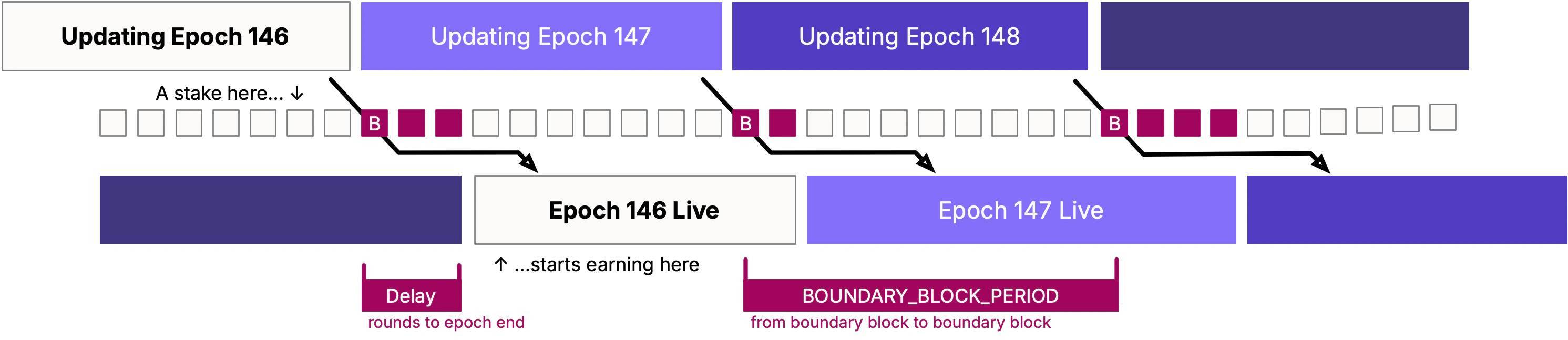 这意味着您的操作将在以下之一激活:
* **纪元 n+1** —— 如果在边界区块之前提交
* **纪元 n+2** —— 如果在边界区块之后提交(在纪元延迟期内)
使用 [`getEpoch()`](/zh/reference/staking/api#getepoch) 检查当前纪元以及边界是否已过:
```solidity theme={null}
(uint64 epoch, bool inEpochDelayPeriod) = IMonadStaking(STAKING_ADDRESS).getEpoch();
// If inEpochDelayPeriod is false: changes take effect in epoch + 1
// If inEpochDelayPeriod is true: changes take effect in epoch + 2
```
一轮(round)不是一个区块 —— 即使有提案缺失,轮次也会递增。您不能通过对区块编号取模来计算纪元边界。请始终使用 `getEpoch()`。
### 提现延迟
已解除委托的质押不会立即可用。调用 `undelegate` 后,您必须等待 `WITHDRAWAL_DELAY`(1 个纪元),然后才能调用 `withdraw` 来提取资金。
## 常见操作
### 委托(Delegate)
要将 MON 委托给验证者,请调用 `delegate(validatorId)` 并将金额作为 `msg.value`:
```solidity theme={null}
IMonadStaking(STAKING_ADDRESS).delegate{value: amount}(validatorId);
```
* `msg.value` 必须至少为 `DUST_THRESHOLD`(1 gwei)。
* 您的委托将在下一个纪元(或再下一个纪元,如果已过边界区块)生效。
* 如果这使得验证者的总质押达到 `ACTIVE_VALIDATOR_STAKE`,则该验证者将被加入活跃集合。
### 解除委托和提现
移除质押是一个两步过程:
**步骤 1:解除委托** —— 通过指定金额和 `withdrawId`(0–255)发起提现:
```solidity theme={null}
IMonadStaking(STAKING_ADDRESS).undelegate(validatorId, amount, withdrawId);
```
**步骤 2:提现** —— 在 `WITHDRAWAL_DELAY` 纪元过后,调用 `withdraw` 提取资金:
```solidity theme={null}
IMonadStaking(STAKING_ADDRESS).withdraw(validatorId, withdrawId);
```
这意味着您的操作将在以下之一激活:
* **纪元 n+1** —— 如果在边界区块之前提交
* **纪元 n+2** —— 如果在边界区块之后提交(在纪元延迟期内)
使用 [`getEpoch()`](/zh/reference/staking/api#getepoch) 检查当前纪元以及边界是否已过:
```solidity theme={null}
(uint64 epoch, bool inEpochDelayPeriod) = IMonadStaking(STAKING_ADDRESS).getEpoch();
// If inEpochDelayPeriod is false: changes take effect in epoch + 1
// If inEpochDelayPeriod is true: changes take effect in epoch + 2
```
一轮(round)不是一个区块 —— 即使有提案缺失,轮次也会递增。您不能通过对区块编号取模来计算纪元边界。请始终使用 `getEpoch()`。
### 提现延迟
已解除委托的质押不会立即可用。调用 `undelegate` 后,您必须等待 `WITHDRAWAL_DELAY`(1 个纪元),然后才能调用 `withdraw` 来提取资金。
## 常见操作
### 委托(Delegate)
要将 MON 委托给验证者,请调用 `delegate(validatorId)` 并将金额作为 `msg.value`:
```solidity theme={null}
IMonadStaking(STAKING_ADDRESS).delegate{value: amount}(validatorId);
```
* `msg.value` 必须至少为 `DUST_THRESHOLD`(1 gwei)。
* 您的委托将在下一个纪元(或再下一个纪元,如果已过边界区块)生效。
* 如果这使得验证者的总质押达到 `ACTIVE_VALIDATOR_STAKE`,则该验证者将被加入活跃集合。
### 解除委托和提现
移除质押是一个两步过程:
**步骤 1:解除委托** —— 通过指定金额和 `withdrawId`(0–255)发起提现:
```solidity theme={null}
IMonadStaking(STAKING_ADDRESS).undelegate(validatorId, amount, withdrawId);
```
**步骤 2:提现** —— 在 `WITHDRAWAL_DELAY` 纪元过后,调用 `withdraw` 提取资金:
```solidity theme={null}
IMonadStaking(STAKING_ADDRESS).withdraw(validatorId, withdrawId);
```
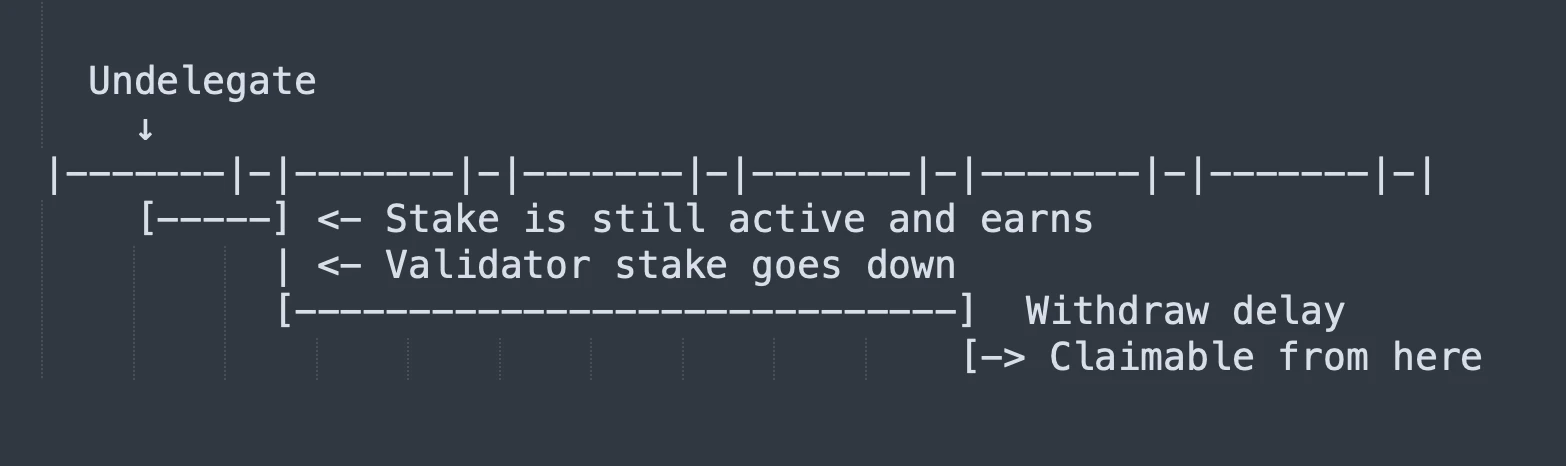
质押可提现性相对于 undelegate 的时间线
* 您只能解除委托 **活跃** 状态的质押(不包括待生效的委托)。
* 每个 `(validator, delegator)` 对最多支持 256 个并发提现请求。
* `withdrawId` 可以在提现完成后重复使用。
### 领取和复投奖励
当您的验证者出块时,奖励会自动累积。您有两个选择:
* **领取奖励** —— 将累积奖励提取到您的账户:
```solidity theme={null}
IMonadStaking(STAKING_ADDRESS).claimRewards(validatorId);
```
领取 **立即** 生效 —— 无纪元延迟。
* **复投奖励** —— 将累积奖励重新委托,增加您的质押:
```solidity theme={null}
IMonadStaking(STAKING_ADDRESS).compound(validatorId);
```
复投的奖励将在下一个纪元激活(遵循标准的时序规则)。
### 查询质押状态
用于读取质押状态的主要视图方法:
| 方法 | 用途 |
| ---------------------------------------------------------------------------------------------------------- | ---------------------- |
| [`getValidator(validatorId)`](/zh/reference/staking/api#getvalidator) | 跨执行、共识和快照视图的完整验证者状态 |
| [`getDelegator(validatorId, address)`](/zh/reference/staking/api#getdelegator) | 委托者针对特定验证者的质押、奖励和待生效变更 |
| [`getWithdrawalRequest(validatorId, address, withdrawId)`](/zh/reference/staking/api#getwithdrawalrequest) | 待提现请求的状态 |
| [`getEpoch()`](/zh/reference/staking/api#getepoch) | 当前纪元以及边界是否已过 |
| [`getConsensusValidatorSet(startIndex)`](/zh/reference/staking/api#get-validatorset) | 当前纪元的领导者验证者(分页) |
| [`getSnapshotValidatorSet(startIndex)`](/zh/reference/staking/api#get-validatorset) | 下一个纪元的领导者验证者(分页) |
| [`getExecutionValidatorSet(startIndex)`](/zh/reference/staking/api#get-validatorset) | 所有符合活跃质押标准的验证者(分页) |
| [`getProposerValId()`](/zh/reference/staking/api#getproposervalid) | 当前区块提议者的验证者 ID |
| [`getDelegations(address, startValId)`](/zh/reference/staking/api#getdelegations) | 委托者已委托的所有验证者(分页) |
| [`getDelegators(validatorId, startDelegator)`](/zh/reference/staking/api#getdelegators) | 某个验证者的所有委托者(分页) |
分页方法每次调用最多返回 100 条结果。首次调用请传入 `startIndex = 0`,之后使用 `nextIndex` 进行后续调用,直到 `isDone` 为 true。
## 约束
由于质押系统是预编译合约而非智能合约,因此在行为上存在一些差异。
* **只允许 `CALL`。** `STATICCALL`、`DELEGATECALL` 和 `CALLCODE` 会回滚。这意味着所有视图方法使用 `nonpayable` 状态可变性,而不是 `view`。
* **无 fork 环境测试。** 质押系统是预编译合约,而非智能合约 —— 该地址上没有代码,所以 fork 测试环境无法工作。
* **边界区块时序。** 在纪元延迟期内(边界区块之后)提交的操作,要到两个纪元之后才生效。如果时序很重要,请检查 `getEpoch()`。
* **粉尘阈值。** 低于 `DUST_THRESHOLD`(1 gwei)的委托将回滚。
* **EIP-7702 注意事项。** 如果某账户使用 EIP-7702 将其委托设置为质押预编译合约地址,则对其发起的所有调用都会回滚。
## 延伸阅读
* [API 参考](/zh/reference/staking/api) —— 质押预编译合约的完整参考,包含方法签名、参数、gas 成本、事件、结构体和 ABI
* [质押如何工作](/zh/monad-arch/consensus/staking) —— Monad 质押系统如何确定验证者投票权重、纪元调度和奖励分配