> ## Documentation Index
> Fetch the complete documentation index at: https://docs.monad.xyz/llms.txt
> Use this file to discover all available pages before exploring further.
# 如何使用 React Native Thirdweb 嵌入式钱包模板
本指南将带您使用 [嵌入式钱包模板](https://github.com/monad-developers/expo-thirdweb-example),该模板使用 [Expo](https://expo.dev/)、[React Native](https://reactnative.dev/) 和 [Thirdweb 嵌入式钱包](https://thirdweb.com/in-app-wallets),在 Monad 上构建移动应用。
开始开发时可以编辑 [`app`](https://github.com/monad-developers/expo-thirdweb-example/tree/main/app) 目录中的文件。本项目使用 [基于文件的路由](https://docs.expo.dev/router/introduction)。
## 前置条件
* Node.js
* Yarn 或 NPM
* 一个 [thirdweb 账户](https://thirdweb.com/login)
- JDK 17(Java Development Kit 17 版本)
* 将 `JAVA_HOME` 环境变量设置为指向您的 JDK 17 安装目录
* 示例: `export JAVA_HOME=/Library/Java/JavaVirtualMachines/microsoft-17.jdk/Contents/Home`
- [Android Studio](https://developer.android.com/studio)(API 版本 35 及以上)
* 查看 [此指南](https://docs.expo.dev/workflow/android-studio-emulator/) 来为 Expo 设置 Android Studio
* 在 Android Studio 中配置 Gradle JDK:
* 打开 Android Studio 的 Settings/Preferences
* 前往 Build, Execution, Deployment → Build Tools → Gradle
* 将 Gradle JDK 设置为 JDK 17(例如 `JAVA_HOME 17.0.13` - `aarch64 /Library/Java/JavaVirtualMachines/microsoft-17.jdk/Contents/Home`)
* [Xcode](https://apps.apple.com/in/app/xcode/id497799835?mt=12)(Xcode 16 需要 OpenSSL 3.3.2000 版本)
* 查看 [此指南](https://docs.expo.dev/workflow/ios-simulator/) 来为 Expo 设置 iOS 模拟器
## 开始
### 安装依赖
```bash theme={null}
yarn install
```
### 设置环境变量
创建 `.env.example` 的副本:
```bash theme={null}
cp .env.example .env
```
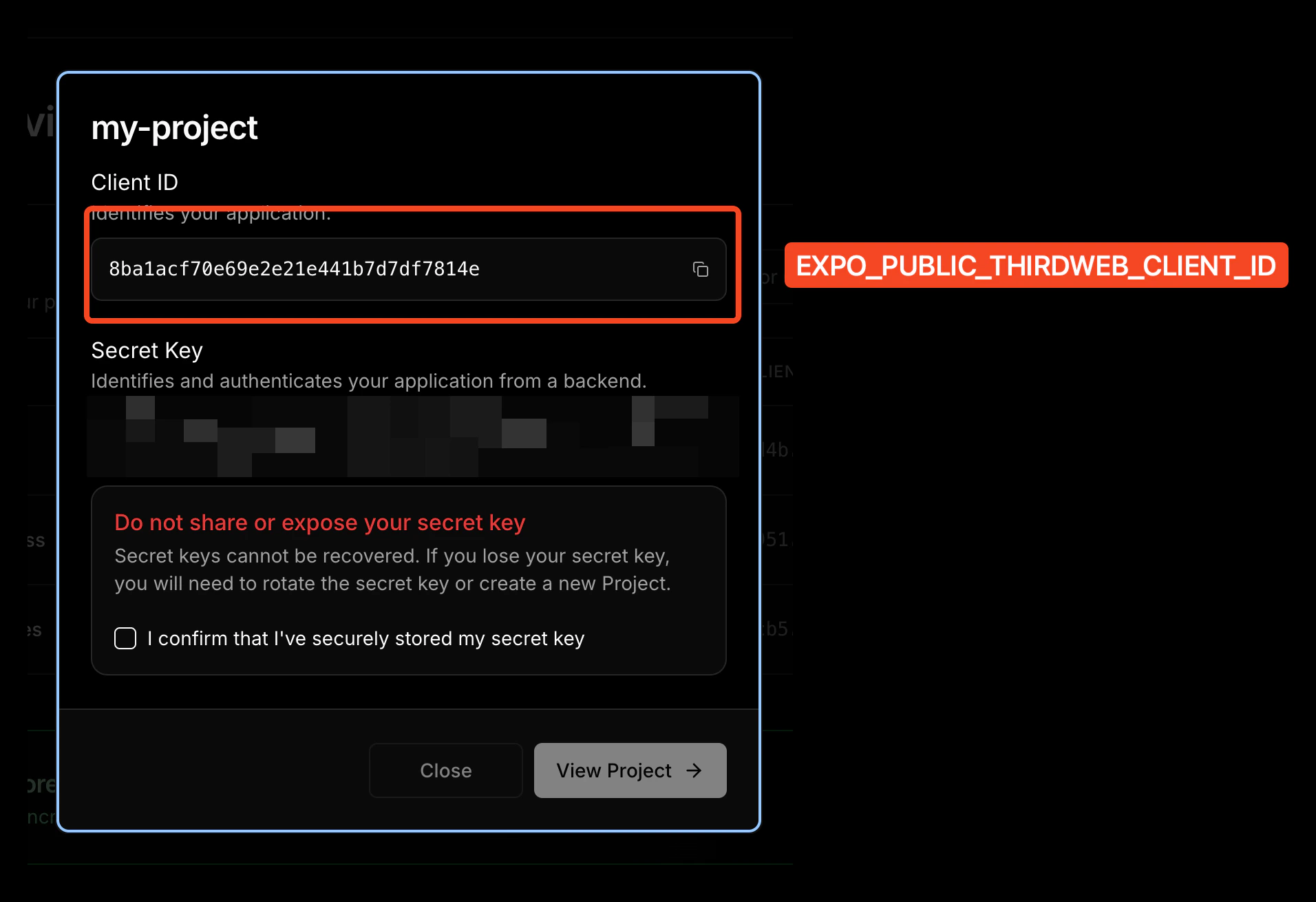
将您的 thirdweb client ID 添加到 `.env` 文件:
```
EXPO_PUBLIC_THIRDWEB_CLIENT_ID=your_client_id_here
```
1. 前往 [thirdweb 仪表盘](https://thirdweb.com/dashboard)
2. 登录或创建新账户
3. 创建新项目

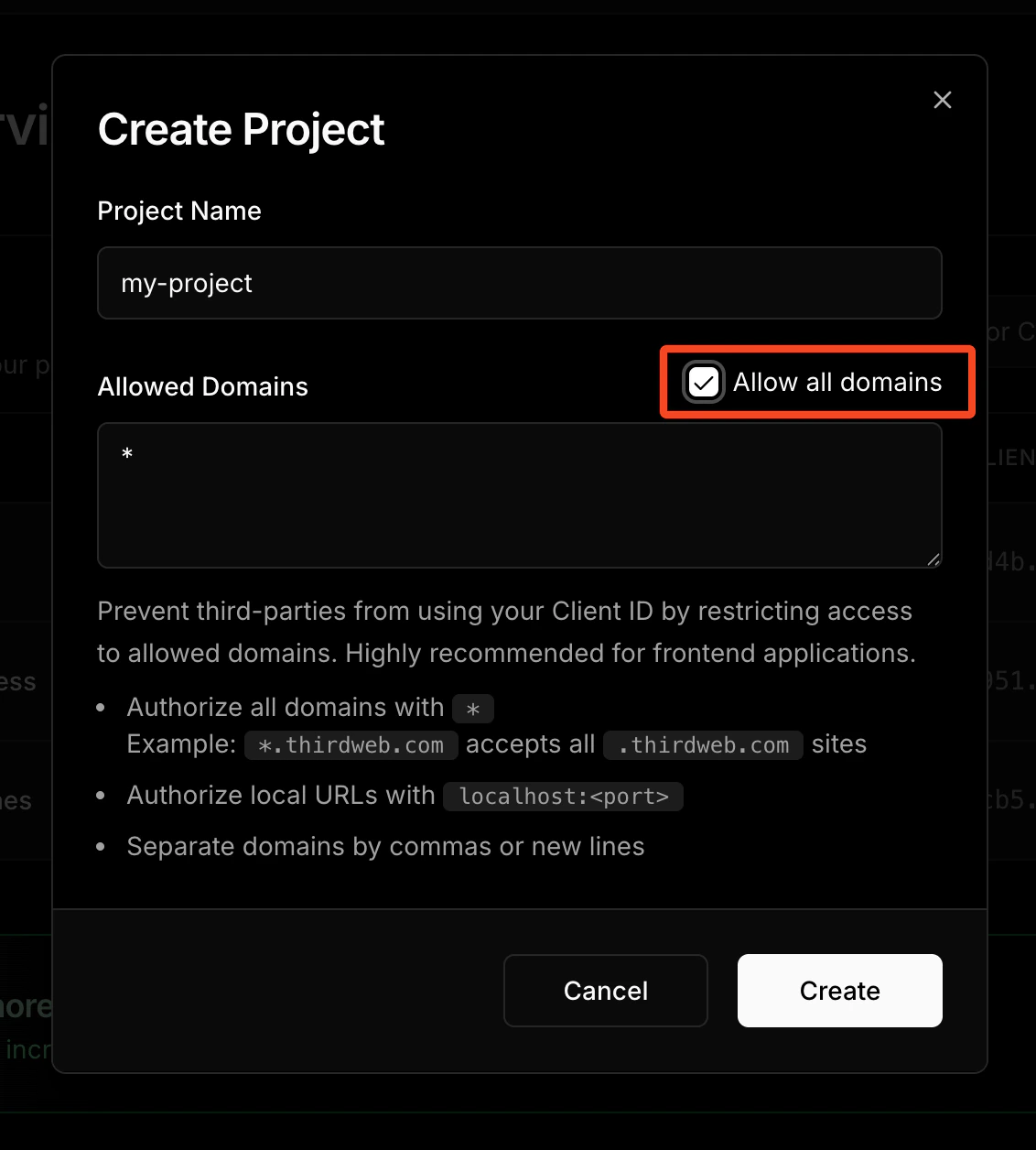 4. 从项目设置中复制您的 Client ID;Client ID 是 `EXPO_PUBLIC_THIRDWEB_CLIENT_ID` 的值。
 ## 启动应用
该模板附带了一个简单的转账示例屏幕,您可以通过编辑 [`app`](https://github.com/monad-developers/expo-thirdweb-example/tree/main/app) 文件夹中的 [`index.tsx`](https://github.com/monad-developers/expo-thirdweb-example/blob/main/app/index.tsx) 文件来编辑它。
### 为原生模块预构建
thirdweb SDK 使用原生模块,这意味着它不能在 Expo Go 上运行。您必须构建 iOS 和 Android 应用以链接原生模块。
```bash theme={null}
npx expo prebuild
```
iOS:
```bash theme={null}
yarn ios
```
Android:
```bash theme={null}
yarn android
```
## 模板的文件夹结构
```
expo-thirdweb-example/
├── app/ # Expo router entrypoint
│ ├── +html.tsx # Web HTML configuration
│ ├── +native-intent.tsx # Deep link handling
│ ├── +not-found.tsx # 404 page
│ ├── _layout.tsx # Root layout with ThirdwebProvider
│ └── index.tsx # Main screen
├── assets/
│ ├── fonts/ # Custom fonts
│ └── images/ # App images and icons
│ ├── adaptive-icon.png
│ ├── icon.png
│ ├── monad-logo.png
│ └── splash.png
├── components/ # Reusable UI components
│ ├── ThemedButton.tsx # Themed button component
│ ├── ThemedText.tsx # Themed text component
│ ├── ThemedView.tsx # Themed view component
│ ├── SocialProfileCard.tsx # Social profile display
│ └── navigation/
│ └── TabBarIcon.tsx # Tab bar icons
├── constants/
│ ├── Colors.ts # App color scheme
│ └── thirdweb.ts # Blockchain configuration
├── hooks/ # Custom React hooks
│ ├── useColorScheme.ts # Theme detection
│ └── useThemeColor.ts # Theme color utilities
├── app.json # Expo app configuration
├── babel.config.js
├── metro.config.js # Metro bundler config
├── package.json
├── tsconfig.json
└── yarn.lock
```
## 自定义您的应用
### 修改应用名称
编辑 [`app.json`](https://github.com/monad-developers/expo-thirdweb-example/blob/main/app.json) 文件中的 `name` 属性:
```json theme={null}
{
"expo": {
"name": "your-app-name", // ← Edit this
...
}
}
```
### 修改应用图标
您可以通过替换 [`assets/images/icon.png`](https://github.com/monad-developers/expo-thirdweb-example/blob/main/assets/images/icon.png) 文件来编辑应用图标。
推荐的应用图标尺寸为 `1024x1024`。
如果您将图标文件命名为其他名称,请相应地编辑 [`app.json`](https://github.com/monad-developers/expo-thirdweb-example/blob/main/app.json) 中的 `icon` 属性:
```json theme={null}
{
"expo": {
"name": "your-app-name",
...
"icon": "./assets/images/icon.png", // ← Change this
...
}
}
```
### 修改启动画面
编辑 [`app.json`](https://github.com/monad-developers/expo-thirdweb-example/blob/main/app.json) 中的 `splash` 对象以修改启动画面:
```json theme={null}
{
"expo": {
"name": "your-app-name",
...
"splash": { // ← Edit this object
"image": "./assets/images/splash.png",
"backgroundColor": "#ffffff"
}
}
}
```
### 修改深度链接方案
编辑 [`app.json`](https://github.com/monad-developers/expo-thirdweb-example/blob/main/app.json) 文件中的 `scheme` 属性以设置您的自定义深度链接方案:
```json theme={null}
{
"expo": {
...
"scheme": "your-app-scheme",
...
}
}
```
例如,如果将其设置为 `mywalletapp`,则轻点 `mywalletapp://` URL 时将打开您的应用。
这是一个构建时配置,在 Expo Go 中无效。
### 修改 `package`/`bundleIdentifier`
发布到应用商店时,您需要一个唯一的 `package`/`bundleIdentifier`。请在 [`app.json`](https://github.com/monad-developers/expo-thirdweb-example/blob/main/app.json) 中修改它:
```json theme={null}
{
"expo": {
"name": "your-app-name",
...
"ios": {
"bundleIdentifier": "com.yourcompany.yourapp", // ← Edit this
...
},
"android": {
...
"package": "com.yourcompany.yourapp" // ← Edit this
},
}
}
```
**thirdweb Bundle ID 配置**:您的 `bundleIdentifier` 和 `package` 必须匹配 thirdweb 项目设置中配置的 Bundle ID 限制。
1. 前往 [thirdweb 仪表盘](https://thirdweb.com/dashboard)
2. 选择您的项目
3. 前往 Settings → Bundle ID Restrictions
4. 将您的 iOS `bundleIdentifier` 和 Android `package` 添加到允许的 Bundle ID 中
这样可以确保您的应用能够正常通过 thirdweb 服务进行身份验证。
## 了解更多
要了解更多关于使用 [Expo](https://expo.dev/)、[thirdweb](https://thirdweb.com/in-app-wallets) 和 [Monad](https://monad.xyz) 开发项目的信息,请查看以下资源:
* Expo:[文档](https://docs.expo.dev/) | [指南](https://docs.expo.dev/guides) | [教程](https://docs.expo.dev/tutorial/introduction/)
* thirdweb:[文档](https://portal.thirdweb.com/typescript/v5) | [模板](https://thirdweb.com/templates) | [YouTube](https://www.youtube.com/@thirdweb)
* Monad:[支持的工具和基础设施](https://docs.monad.xyz/tooling-and-infra/)
### 加入社区
在 [Monad Developer Discord](https://discord.com/invite/monaddev) 与其他 Monad 开发者交流和提问
## 启动应用
该模板附带了一个简单的转账示例屏幕,您可以通过编辑 [`app`](https://github.com/monad-developers/expo-thirdweb-example/tree/main/app) 文件夹中的 [`index.tsx`](https://github.com/monad-developers/expo-thirdweb-example/blob/main/app/index.tsx) 文件来编辑它。
### 为原生模块预构建
thirdweb SDK 使用原生模块,这意味着它不能在 Expo Go 上运行。您必须构建 iOS 和 Android 应用以链接原生模块。
```bash theme={null}
npx expo prebuild
```
iOS:
```bash theme={null}
yarn ios
```
Android:
```bash theme={null}
yarn android
```
## 模板的文件夹结构
```
expo-thirdweb-example/
├── app/ # Expo router entrypoint
│ ├── +html.tsx # Web HTML configuration
│ ├── +native-intent.tsx # Deep link handling
│ ├── +not-found.tsx # 404 page
│ ├── _layout.tsx # Root layout with ThirdwebProvider
│ └── index.tsx # Main screen
├── assets/
│ ├── fonts/ # Custom fonts
│ └── images/ # App images and icons
│ ├── adaptive-icon.png
│ ├── icon.png
│ ├── monad-logo.png
│ └── splash.png
├── components/ # Reusable UI components
│ ├── ThemedButton.tsx # Themed button component
│ ├── ThemedText.tsx # Themed text component
│ ├── ThemedView.tsx # Themed view component
│ ├── SocialProfileCard.tsx # Social profile display
│ └── navigation/
│ └── TabBarIcon.tsx # Tab bar icons
├── constants/
│ ├── Colors.ts # App color scheme
│ └── thirdweb.ts # Blockchain configuration
├── hooks/ # Custom React hooks
│ ├── useColorScheme.ts # Theme detection
│ └── useThemeColor.ts # Theme color utilities
├── app.json # Expo app configuration
├── babel.config.js
├── metro.config.js # Metro bundler config
├── package.json
├── tsconfig.json
└── yarn.lock
```
## 自定义您的应用
### 修改应用名称
编辑 [`app.json`](https://github.com/monad-developers/expo-thirdweb-example/blob/main/app.json) 文件中的 `name` 属性:
```json theme={null}
{
"expo": {
"name": "your-app-name", // ← Edit this
...
}
}
```
### 修改应用图标
您可以通过替换 [`assets/images/icon.png`](https://github.com/monad-developers/expo-thirdweb-example/blob/main/assets/images/icon.png) 文件来编辑应用图标。
推荐的应用图标尺寸为 `1024x1024`。
如果您将图标文件命名为其他名称,请相应地编辑 [`app.json`](https://github.com/monad-developers/expo-thirdweb-example/blob/main/app.json) 中的 `icon` 属性:
```json theme={null}
{
"expo": {
"name": "your-app-name",
...
"icon": "./assets/images/icon.png", // ← Change this
...
}
}
```
### 修改启动画面
编辑 [`app.json`](https://github.com/monad-developers/expo-thirdweb-example/blob/main/app.json) 中的 `splash` 对象以修改启动画面:
```json theme={null}
{
"expo": {
"name": "your-app-name",
...
"splash": { // ← Edit this object
"image": "./assets/images/splash.png",
"backgroundColor": "#ffffff"
}
}
}
```
### 修改深度链接方案
编辑 [`app.json`](https://github.com/monad-developers/expo-thirdweb-example/blob/main/app.json) 文件中的 `scheme` 属性以设置您的自定义深度链接方案:
```json theme={null}
{
"expo": {
...
"scheme": "your-app-scheme",
...
}
}
```
例如,如果将其设置为 `mywalletapp`,则轻点 `mywalletapp://` URL 时将打开您的应用。
这是一个构建时配置,在 Expo Go 中无效。
### 修改 `package`/`bundleIdentifier`
发布到应用商店时,您需要一个唯一的 `package`/`bundleIdentifier`。请在 [`app.json`](https://github.com/monad-developers/expo-thirdweb-example/blob/main/app.json) 中修改它:
```json theme={null}
{
"expo": {
"name": "your-app-name",
...
"ios": {
"bundleIdentifier": "com.yourcompany.yourapp", // ← Edit this
...
},
"android": {
...
"package": "com.yourcompany.yourapp" // ← Edit this
},
}
}
```
**thirdweb Bundle ID 配置**:您的 `bundleIdentifier` 和 `package` 必须匹配 thirdweb 项目设置中配置的 Bundle ID 限制。
1. 前往 [thirdweb 仪表盘](https://thirdweb.com/dashboard)
2. 选择您的项目
3. 前往 Settings → Bundle ID Restrictions
4. 将您的 iOS `bundleIdentifier` 和 Android `package` 添加到允许的 Bundle ID 中
这样可以确保您的应用能够正常通过 thirdweb 服务进行身份验证。
## 了解更多
要了解更多关于使用 [Expo](https://expo.dev/)、[thirdweb](https://thirdweb.com/in-app-wallets) 和 [Monad](https://monad.xyz) 开发项目的信息,请查看以下资源:
* Expo:[文档](https://docs.expo.dev/) | [指南](https://docs.expo.dev/guides) | [教程](https://docs.expo.dev/tutorial/introduction/)
* thirdweb:[文档](https://portal.thirdweb.com/typescript/v5) | [模板](https://thirdweb.com/templates) | [YouTube](https://www.youtube.com/@thirdweb)
* Monad:[支持的工具和基础设施](https://docs.monad.xyz/tooling-and-infra/)
### 加入社区
在 [Monad Developer Discord](https://discord.com/invite/monaddev) 与其他 Monad 开发者交流和提问