> ## Documentation Index
> Fetch the complete documentation index at: https://docs.monad.xyz/llms.txt
> Use this file to discover all available pages before exploring further.

# How to set up an x402-enabled endpoint with Monad support

This guide shows how to set up payable endpoints using x402 payments and Monad's facilitator. It works on Monad testnet/mainnet.

## What is x402?

x402 is the HTTP 402 "Payment Required" status code reborn as a minimal protocol for internet‑native micropayments.

Instead of subscriptions or paywalls that require accounts, x402 lets any HTTP endpoint become instantly payable:

1. Client requests a resource
2. Server responds 402 with a small JSON payment requirement
3. Client signs a payment authorization and resends the request
4. Server verifies and serves the content

### Beyond legacy limitations

x402 is designed for a modern internet economy, solving key limitations of legacy systems:

* **Reduce fees and friction:** Direct onchain payments without intermediaries, high fees, or manual setup.
* **Micropayments & usage-based billing:** Charge per call or feature with simple, programmable pay-as-you-go flows.
* **Machine-to-machine transactions:** Let AI agents pay and access services autonomously with no keys or human input needed.

## Why x402 on Monad?

Monad is a fully EVM‑compatible Layer 1 with:

* 10,000 TPS
* \~0.4s block times
* Single‑slot finality
* Parallel execution
* Extremely low fees

These properties make Monad an ideal environment for **true micropayments and agent-to-agent commerce**. Payments **settle instantly at low cost and avoid mempool congestion**, perfect when many AI agents pay per API call.

### Core Flow (Direct Payment)

```mermaid theme={null}
sequenceDiagram
    participant Client
    participant Server
    participant Monad Chain

    Client->>Server: GET /premium-content
    Server-->>Client: 402 Payment Required + requirements JSON
    Note over Client: Sign authorization<br/>(local, no tx)
    Client->>Server: GET /premium-content<br/>(PAYMENT-SIGNATURE header)
    Server->>Monad Chain: transferWithAuthorization()
    Monad Chain-->>Server: tx confirmed
    Server-->>Client: 200 OK + content
```

### Facilitator Flow (Recommended for Production)

A facilitator service is optional but recommended in production. Facilitators can batch transactions, cover gas, handle refunds, and simplify client logic.

```mermaid theme={null}
sequenceDiagram
    participant Client
    participant Server
    participant Facilitator
    participant Monad Chain

    Note over Facilitator: Facilitator is optional but solves gas,<br/>refunds, batching, and replay protection

    Client->>Server: GET /premium-content
    Server-->>Client: 402 + requirements
    Note over Client: Sign authorization<br/>(local, no tx)
    Client->>Server: GET /premium-content<br/>(PAYMENT-SIGNATURE header)
    Server->>Facilitator: POST /verify
    Facilitator-->>Server: { isValid: true }
    Server-->>Client: 200 + resource
    Server->>Facilitator: POST /settle
    Facilitator->>Monad Chain: transferWithAuthorization()
    Monad Chain-->>Facilitator: tx confirmed
    Facilitator-->>Server: { success, txHash }
```

## Building an x402-based app using Monad x402 facilitator

### Prerequisites

* Node.js 18+
* An EVM wallet
* Access to Monad testnet funds (USDC test tokens below)

<Note>
  Monad Facilitator only supports x402 version 2 and above.

  Migration guide that explains the differences: [https://docs.x402.org/guides/migration-v1-to-v2](https://docs.x402.org/guides/migration-v1-to-v2)
</Note>

<Accordion title="How to get USDC tokens on Monad testnet">
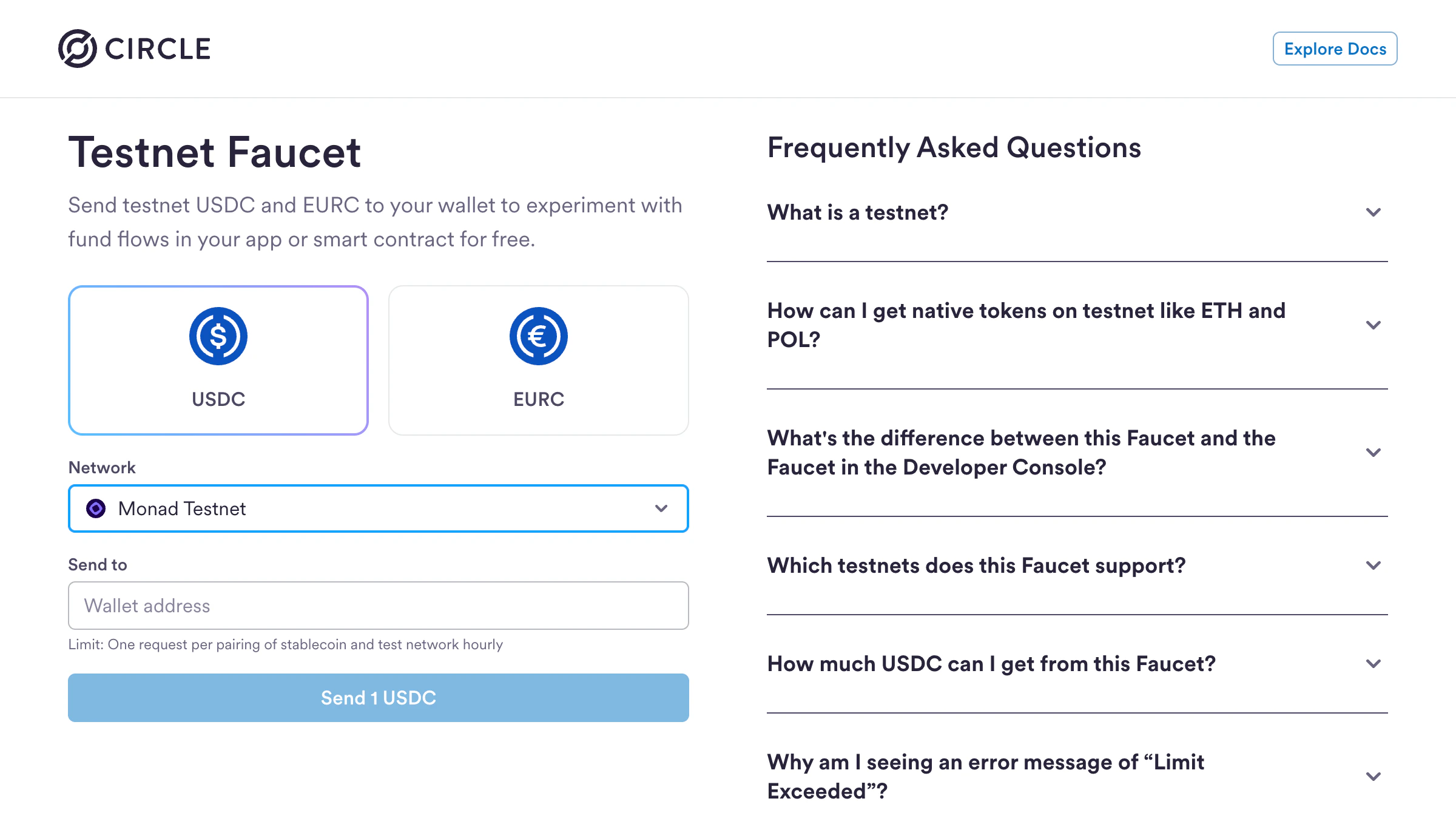
  You can get USDC tokens for Monad testnet using Circle's faucet:

  1. Visit [https://faucet.circle.com](https://faucet.circle.com)
  2. Select **USDC** as the token
  3. Select **Monad Testnet** from the Network dropdown
  4. Enter your wallet address
  5. Click **Send 1 USDC**

  **Limit:** One request per (stablecoin, testnet) pair every 2 hours

  <img src="https://mintcdn.com/monadfoundation-40611fb6/5Mt9_Scj9fq4fC68/static/img/guides/x402-guide/3.png?fit=max&auto=format&n=5Mt9_Scj9fq4fC68&q=85&s=156c17282ff91da33d7031a964726717" alt="circle_faucet" width="2400" height="1358" data-path="static/img/guides/x402-guide/3.png" />

  You'll also need testnet MON tokens for gas fees. Get them from the [Monad faucet](https://faucet.monad.xyz).
</Accordion>

### Step 1: Initialize a Next.js App

Create a new Next.js project:

```bash theme={null}
npx create-next-app@latest my-x402-app
```

When prompted, select the following options:

* ✅ TypeScript
* ✅ ESLint
* ✅ Tailwind CSS
* ✅ `src/` directory
* ✅ App Router
* ✅ Customize default import alias: `@/*` (default)

Navigate to your project:

```bash theme={null}
cd my-x402-app
```

Install the x402 packages:

<Note>
  Install x402 packages with version `2.2.0` and above.
</Note>

```bash theme={null}
npm install @x402/core @x402/evm @x402/fetch @x402/next
```

Create a `.env.local` file for your environment variables:

```bash theme={null}
touch .env.local
```

### Step 2: Create a `payTo` address

A `payTo` address is used to receive payments and interact with the blockchain from your backend.

Copy the wallet address and add it to your `.env.local` file as `PAY_TO_ADDRESS`

```
PAY_TO_ADDRESS=0xYourWallet
```

### Step 3: Create a server side payable endpoint

```ts lines title="src/app/api/premium/route.ts" theme={null}
import { NextResponse } from "next/server";
import { withX402, type RouteConfig } from "@x402/next";
import { x402ResourceServer, HTTPFacilitatorClient } from "@x402/core/server";
import { ExactEvmScheme } from "@x402/evm/exact/server";
import type { Network } from "@x402/core/types";

// Monad Testnet configuration
const MONAD_NETWORK: Network = "eip155:10143";
const MONAD_USDC_TESTNET = "0x534b2f3A21130d7a60830c2Df862319e593943A3";

// Monad Facilitator URL
const FACILITATOR_URL = "https://x402-facilitator.molandak.org"; 

if (!process.env.PAY_TO_ADDRESS) {
  throw new Error("PAY_TO_ADDRESS environment variable is required");
}
const PAY_TO = process.env.PAY_TO_ADDRESS;

// Create facilitator client for Monad
const facilitatorClient = new HTTPFacilitatorClient({ url: FACILITATOR_URL });

// Create and configure x402 resource server
const server = new x402ResourceServer(facilitatorClient);

// Create Exact EVM Scheme with custom money parser for Monad USDC
const monadScheme = new ExactEvmScheme();
monadScheme.registerMoneyParser(async (amount: number, network: string) => {
  if (network === MONAD_NETWORK) {
    // Convert decimal amount to USDC smallest units (6 decimals)
    const tokenAmount = Math.floor(amount * 1_000_000).toString();
    return {
      amount: tokenAmount,
      asset: MONAD_USDC_TESTNET, // Raw address for EIP-712 verifyingContract
      extra: {
        name: "USDC",
        version: "2",
      },
    };
  }
  return null; // Use default parser for other networks
});

// Register Monad network with custom scheme
server.register(MONAD_NETWORK, monadScheme);

// Route configuration
const routeConfig: RouteConfig = {
  accepts: {
    scheme: "exact",
    network: MONAD_NETWORK,
    payTo: PAY_TO,
    price: "$0.001",
  },
  resource: "http://localhost:3000/api/premium", // Use relative path to avoid host mismatch
};

// Handler that returns full article content
async function handler(request: NextRequest) {
  return NextResponse.json({
    content: "Return premium content",
    unlockedAt: new Date().toISOString(),
  });
}

// Export GET method wrapped with x402 payment protection
export const GET = withX402(handler, routeConfig, server);
```

### Step 4: Client-side setup (consuming paid endpoint)

Below is an example of consuming the paid endpoint using a Next.js app, however the endpoint can be consumed via an agent script as well.

```tsx lines title="src/app/page.tsx" theme={null}
"use client";

import { useState, useCallback, useEffect } from "react";
import { useAccount, useWalletClient } from "wagmi";
import { wrapFetchWithPayment } from "@x402/fetch";
import { ExactEvmScheme } from "@x402/evm";
import { x402Client } from "@x402/core/client";

// x402 configuration
const x402Config = {
  chainId: "eip155:10143" as const,
  usdcAddress: "0x534b2f3A21130d7a60830c2Df862319e593943A3", // MONAD USDC TESTNET
  facilitator: "https://x402-facilitator.molandak.org", // MONAD FACILITATOR URL
  price: "0.001", // USDC
};

export default function Home() {
  const { isConnected, address } = useAccount();
  const { data: walletClient } = useWalletClient();
  const [message, setMessage] = useState("Pay $0.001 USDC to unlock premium content");
  const [status, setStatus] = useState<"idle" | "loading" | "success" | "error">("idle");

  // This function allows signing a message, and pay USDC gaslessly. 
  const handleUnlock = useCallback(async () => {
    if (!walletClient || !address) {
      setError("Please connect your wallet first");
      return;
    }

    setIsLoading(true);
    setError(null);

    try {
      // Create EVM signer compatible with x402 ClientEvmSigner interface
      const evmSigner = {
        address: address as `0x${string}`,
        signTypedData: async (message: {
          domain: Record<string, unknown>;
          types: Record<string, unknown>;
          primaryType: string;
          message: Record<string, unknown>;
        }) => {
          return walletClient.signTypedData({
            domain: message.domain as Parameters<typeof walletClient.signTypedData>[0]["domain"],
            types: message.types as Parameters<typeof walletClient.signTypedData>[0]["types"],
            primaryType: message.primaryType,
            message: message.message,
          });
        },
      };

      // Create the Exact EVM scheme for signing
      const exactScheme = new ExactEvmScheme(evmSigner);

      // Create x402 client and register the scheme
      const client = new x402Client()
        .register(x402Config.chainId, exactScheme);

      console.log("x402 client configured for network:", x402Config.chainId);

      // Wrap fetch with x402 payment capability
      const paymentFetch = wrapFetchWithPayment(fetch, client);

      console.log("Making payment request to /api/article...");

      // Make request to protected endpoint
      const response = await paymentFetch("/api/premium", {
        method: "GET",
        headers: {
          "Content-Type": "application/json",
        },
      });

      if (!response.ok) {
        // Try to parse x402 payment-required header for detailed error
        const paymentHeader = response.headers.get("payment-required");

        if (paymentHeader && response.status === 402) {
          try {
            const paymentData = JSON.parse(atob(paymentHeader));
            console.error("Payment error details:", paymentData);

            // Extract user-friendly error message
            if (paymentData.error?.includes("insufficient_funds")) {
              throw new Error("INSUFFICIENT_FUNDS");
            }
            if (paymentData.error?.includes("unexpected_error")) {
              throw new Error("UNEXPECTED_ERROR");
            }
            if (paymentData.error) {
              throw new Error(paymentData.error);
            }
          } catch (e) {
            if (e instanceof Error && e.message === "INSUFFICIENT_FUNDS") {
              throw e;
            }
            // Failed to parse header, continue to generic error
          }
        }

        const errorText = await response.text().catch(() => "");
        let errorData: Record<string, unknown> = {};
        try {
          errorData = JSON.parse(errorText);
        } catch {
          // Not JSON
        }
        throw new Error(
          errorData.error as string ||
          errorData.details as string ||
          `Request failed: ${response.status}`
        );
      }

      const data = await response.json();

      // Cache the unlocked content in LocalStorage
      localStorage.setItem(
        "premimum_content_unlocked",
        JSON.stringify({
          content: data.content,
          timestamp: Date.now(),
        })
      );
    } catch (err) {
      console.error("Unlock error:", err);
      const message = err instanceof Error ? err.message : "Failed to unlock article";

      // Map technical errors to user-friendly messages
      if (
        message.includes("User rejected") ||
        message.includes("User denied") ||
        message.includes("user rejected")
      ) {
        setError("CANCELLED");
      } else if (message === "INSUFFICIENT_FUNDS" || message.includes("insufficient_funds")) {
        setError("INSUFFICIENT_FUNDS");
      } else if (message === "UNEXPECTED_ERROR" || message.includes("unexpected_error")) {
        setError("UNEXPECTED_ERROR");
      } else {
        setError(message);
      }
    } finally {
      setIsLoading(false);
    }
  }, [walletClient, address]);

  return (
    <main className="min-h-screen bg-zinc-950 flex items-center justify-center p-6">
      <div className="max-w-md w-full space-y-6">
        <div className="text-center space-y-2">
          <h1 className="text-2xl font-bold text-white">x402 on Monad</h1>
          <p className="text-zinc-400 text-sm">
            Micropayments via Thirdweb facilitator.{" "}
            <a href="https://docs.monad.xyz/guides/x402-guide" className="text-violet-400 hover:underline">
              Docs
            </a>
          </p>
        </div>

        <button
          onClick={handleUnlock}
          disabled={status === "loading"}
          className="w-full py-3 px-4 bg-violet-600 hover:bg-violet-500 disabled:bg-violet-800 disabled:cursor-wait text-white font-medium rounded-lg transition-colors"
        >
          {status === "loading" ? "Processing..." : "Pay & Unlock Content"}
        </button>

        <div className={`p-4 rounded-lg text-sm ${
          status === "error" ? "bg-red-950 text-red-300" :
          status === "success" ? "bg-green-950 text-green-300" :
          "bg-zinc-900 text-zinc-300"
        }`}>
          {message}
        </div>
      </div>
    </main>
  );
}
```

## Running Your x402 App

Now you're ready to test your x402 payment flow:

1. Start your development server:

   ```bash theme={null}
   npm run dev
   ```

2. Open [http://localhost:3000](http://localhost:3000) in your browser

3. Click "Pay & Unlock Content"

4. Connect your wallet

5. Approve the USDC payment

6. See the content unlock instantly!

## Facilitator API

For developers who are interested in using the barebones Facilitator API, here are the supported endpoints with examples.

Facilitator URL: `https://x402-facilitator.molandak.org`
Network support: Mainnet and Testnet.

### GET `/supported`

Returns supported networks, schemes, and signer addresses.

```ts theme={null}
const FACILITATOR_URL = "https://x402-facilitator.molandak.org";

async function testSupported(): Promise<void> {
  console.log("\n--- GET /supported ---");

  const response = await fetch(`${FACILITATOR_URL}/supported`);
  if (!response.ok) throw new Error(`Failed: ${response.status}`);

  const data = await response.json();
  console.log(JSON.stringify(data, null, 2));
  return data;
}
```

### POST `/verify`

Verify a payment signature.

```ts theme={null}
interface NetworkConfig {
  chainId: Network;
  name: string;
  rpcUrl: string;
  explorerUrl: string;
  usdcAddress: `0x${string}`;
  usdcDecimals: number;
  chainIdNumber: number;
}

/**
 * This function manually constructs and signs the EIP-712 typed data that
 * the x402 client library handles automatically.
 */
async function testVerify(
  account: ReturnType<typeof privateKeyToAccount>,
  networkConfig: NetworkConfig
): Promise<{ isValid: boolean; payload: any }> {
  console.log("\n--- POST /verify ---");
  const now = Math.floor(Date.now() / 1000);
  const nonce = keccak256(toHex(Math.random().toString()));
  const ACCOUNT_ADDRESS = "0x0000000000000000000000000000000000000000";

  // TransferWithAuthorization parameters (ERC-3009)
  const authorization = {
    from: ACCOUNT_ADDRESS, // Account that is paying
    to: PAY_TO_ADDRESS, // Receiver address
    value: "1000", // 0.001 USDC (6 decimals)
    validAfter: (now - 60).toString(), // Start validity 60s in the past to handle clock skew
    validBefore: (now + 900).toString(), // 15 minutes
    nonce,
  };

  // EIP-712 domain - must match USDC contract's DOMAIN_SEPARATOR
  const domain = {
    name: "USDC",  // Monad USDC uses "USDC" (not "USD Coin")
    version: "2",
    chainId: BigInt(networkConfig.chainIdNumber),
    verifyingContract: networkConfig.usdcAddress,
  };

  // EIP-712 type definition for TransferWithAuthorization
  const types = {
    TransferWithAuthorization: [
      { name: "from", type: "address" },
      { name: "to", type: "address" },
      { name: "value", type: "uint256" },
      { name: "validAfter", type: "uint256" },
      { name: "validBefore", type: "uint256" },
      { name: "nonce", type: "bytes32" },
    ],
  };

  const message = {
    from: authorization.from,
    to: authorization.to,
    value: BigInt(authorization.value),
    validAfter: BigInt(authorization.validAfter),
    validBefore: BigInt(authorization.validBefore),
    nonce: authorization.nonce as `0x${string}`,
  };

  const signature = await account.signTypedData({
    domain,
    types,
    primaryType: "TransferWithAuthorization",
    message,
  });

  const requestBody = {
    x402Version: 2,
    payload: {
      authorization,
      signature,
    },
    resource: {
      url: "http://test/resource",
      description: "Test resource",
      mimeType: "application/json",
    },
    accepted: {
      scheme: "exact",
      network: networkConfig.chainId,
      amount: authorization.value,
      asset: networkConfig.usdcAddress,
      payTo: authorization.to,
      maxTimeoutSeconds: 300,
      extra: {
        name: "USDC",
        version: "2",
      },
    },
  };

  const response = await fetch(`${FACILITATOR_URL}/verify`, {
    method: "POST",
    headers: { "Content-Type": "application/json" },
    body: JSON.stringify(requestBody),
  });

  const data = await response.json();
  console.log(JSON.stringify(data, null, 2));

  return { isValid: data.isValid, payload: requestBody };
}
```

### POST `/settle`

Execute the payment on-chain. Facilitator pays gas.

```ts theme={null}
interface NetworkConfig {
  chainId: Network;
  name: string;
  rpcUrl: string;
  explorerUrl: string;
  usdcAddress: `0x${string}`;
  usdcDecimals: number;
  chainIdNumber: number;
}

/** POST /settle - Execute the payment on-chain. Facilitator pays gas. */
async function testSettle(
  payload: any,
  networkConfig: NetworkConfig
): Promise<void> {
  console.log("\n--- POST /settle ---");

  const response = await fetch(`${FACILITATOR_URL}/settle`, {
    method: "POST",
    headers: { "Content-Type": "application/json" },
    body: JSON.stringify(payload),
  });

  const data = await response.json();
  console.log(JSON.stringify(data, null, 2));

  if (data.success && data.transaction) {
    // Transaction success
  } else if (data.errorReason) {
    console.log(`Failed: ${data.errorReason}`);
  }
}
```

## What's Next?

You've successfully built an x402 payment-enabled app on Monad! Here are some ideas to extend your implementation:

* **Add more payable endpoints** - Create different pricing tiers for various content or API calls
* **Build AI agent integrations** - Enable autonomous agents to pay for and access your APIs

## Resources

* [x402 Protocol Specification](https://www.x402.org/)
* [Monad Developer Discord](https://discord.gg/monaddev)
* [Migration Guide: V1 to V2](https://docs.x402.org/guides/migration-v1-to-v2)

## Need Help?

If you run into issues or have questions, join the [Monad Developer Discord](https://discord.gg/monaddev)

Happy building!